What is Docker Swarm?
As someone who loves experimenting with wacky self-hosted services, let me tell you, containers are a godsend for home labs. They don’t consume too many resources, provide decent isolation provisions, and are fairly simple to use once you get the hang of CLI terminal commands (or switch to Portainer, if you prefer web interfaces).
But once you dive into the container rabbit hole, you could end up with dozens – if not hundreds – of apps and services running inside containerized environments. Docker Swarm can help you out, and here’s a byte-sized article to help you get up to speed with this neat utility.
If you like tinkering with containers or want some invaluable learning experience, Kubernetes will be a worthy addition to your experimentation server
What’s Docker Swarm anyway?
It’s like Kubernetes, but simpler
In technical jargon, Docker Swarm is a container orchestration platform that you can deploy on multiple systems (including virtual machines) to manage your services effectively. Simply put, it lets you work with Docker environments on multiple machines to scale your containers and balance their load to meet your home lab needs. If you’re familiar with server operating systems like Proxmox, Docker Swarm is similar to your average cluster, except it’s concerned with running Docker containers rather than powering virtual machines.
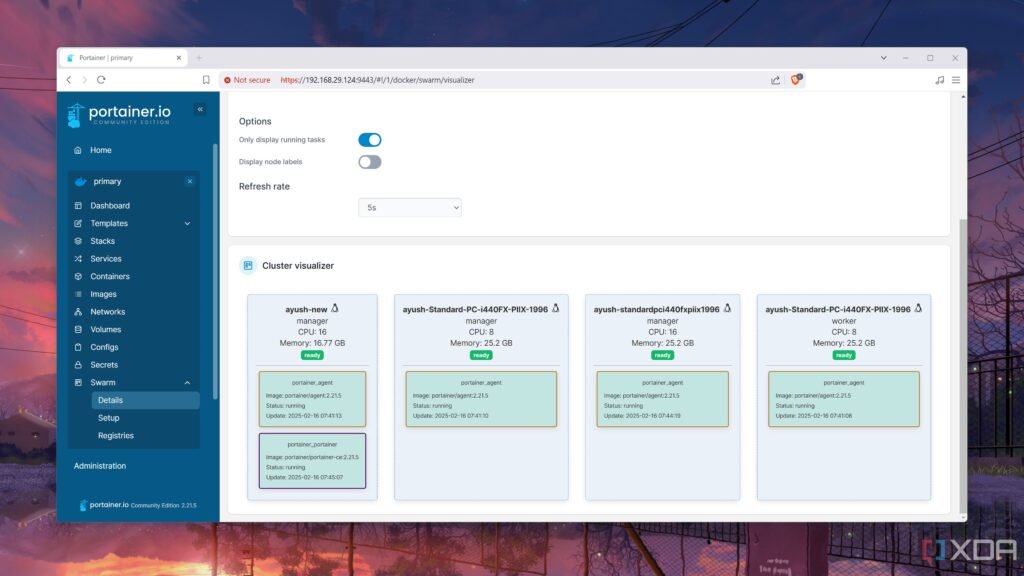
Like a normal home lab cluster, Docker Swarm categorizes nodes into manager and worker machines. The manager nodes are concerned with – you guessed it – overseeing the operations of the cluster, and you’ll frequently use it to delegate tasks to the rest of the machines. Meanwhile, the worker nodes are responsible for running the containers, but aren’t involved in maintaining the quorum of your Swarm setup. Speaking of, you’ll want at least three Docker manager nodes to maintain quorum if you want a high-availability cluster.
Interestingly, Docker Swarm uses services as the keyword to deploy apps inside the nodes. As such, you’ll typically manage multiple containers (formed from the same image) inside a Docker Swarm configuration.
Should you use Docker Swarm in your home lab?
It’s definitely worth trying out
If you’re looking for an easy orchestration platform to manage your containers and ensure they remain operational at all times, Docker Swarm will be a solid addition to your home server. Like Kubernetes, you can set up Docker Swarm on a bunch of Raspberry Pi’s and turn them into a full-on high-availability cluster capable of running pretty much every containerized service you can throw at it.
But unlike its rival, Docker Swarm is fairly easy to set up and tinker with. Rather than jumping through many hoops just to deploy a MicroK8s environment, you just need to install Docker Engine and run the command sudo docker swarm init –advertise-addr IP_address_of_leader on the system you intend to use as the leader among the manager nodes. Thereafter, you can switch to the secondary nodes and run the docker swarm join –token some_token_number IP_address_of_leader:2377 command before promoting them with sudo docker node promote Node_Name.
Plus, Docker Swarm is compatible with Portainer, so you’ve got a decent web UI to work with if you’re not fond of complicated terminal commands. Of course, the simple nature of Docker Swarm also has its drawbacks. For instance, Kubernetes is way better at autoscaling than Swarm, and since it’s tied to the Docker API, you can’t really use Podman containers with it either.
Is Docker Swarm overkill for a home lab?
Surprisingly… no. As someone who loves tinkering with different container orchestration platforms, I daresay Swarm is the easiest of the bunch. It’s really easy to work with and doesn’t force you to learn complicated commands or set up additional packages to manage your containers. Sure, it’s nowhere near the best tools for DevOps enthusiasts or sysadmin lovers. But for the average home labber, Docker Swarm is more than capable of managing your containerization needs.