Anker Thunderbolt 5 docking station in the test
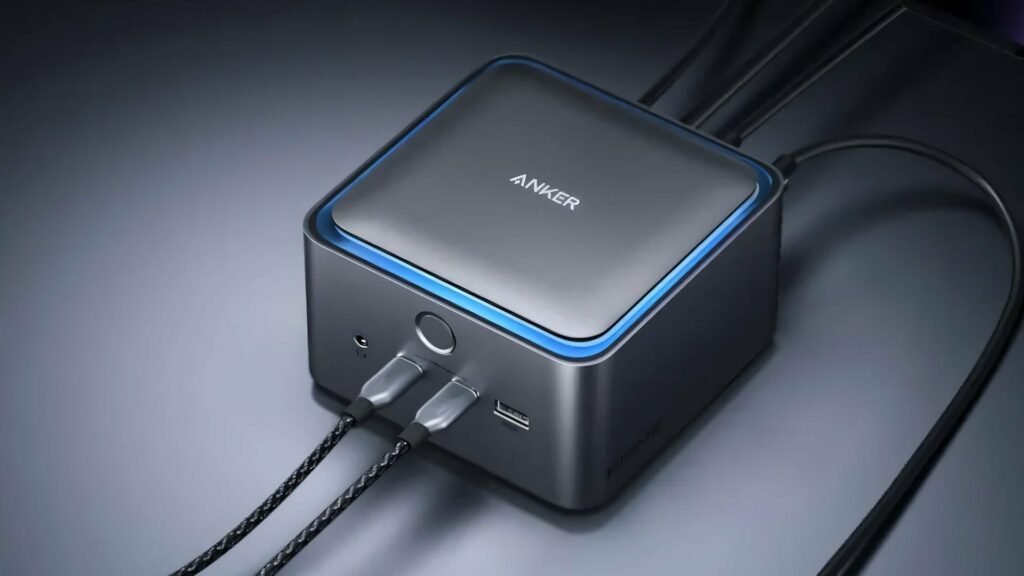
The Anker Prime TB5 Docking Station brings 14 ports and Thunderbolt 5 power to modern Macs and PCs. But how does the compact dock justify its proud price of 380 euros? We took a closer look at Anker’s desktop extension in the test.
Anker Thunderbolt 5 docking stations have now established themselves on the market and the selection is constantly growing. The Anker Prime TB5 was one of the first models available and is aimed at demanding users. After several months of practical use, it becomes clear whether the compact docking station can meet our high expectations and where it reaches its limits.
Design: Compact instead of bulky
The Anker Prime TB5 Dock is initially noticeable because of its shape. Instead of the usual flat, rectangular design, Anker uses a compact, almost square housing. It is no coincidence that the design is reminiscent of Apple’s Mac Mini or Mac Studio and therefore fits harmoniously into existing setups. The dimensions are roughly the same as an M4 Mac Mini, although the docking station is about one centimeter higher. A plus point is the integrated 232-watt power supply. Unlike many competing products, this eliminates the need to find a suitable place for a bulky power brick. Only a power cable needs to be led to the socket. Furthermore, the housing is made of gray aluminum and offers solid workmanship. There is a discreet blue LED light ring on the top that shows the operating status and can be deactivated if desired.
The active cooling using a fan proved to be pleasantly quiet in the test. At normal office volume or when playing music, the device is practically inaudible – if at all at a whisper level. Another positive aspect: Even when the ports are fully occupied, the case hardly gets warm – a clear difference to passively cooled alternatives like the CalDigit TS5 Plus. However, the power button on the front turns out to be a small weak point. It doesn’t respond particularly tactilely, and occasionally the docking station doesn’t register input immediately. To completely shut down, for example, the button has to be pressed for more than two seconds, which sometimes proves to be cumbersome in practice – but it can’t be said to be a dealbreaker.
Port variety with small limitations
The Anker Prime TB5 docking station offers a total of 14 ports, and the distribution appears well thought out. On the front there are two USB-C ports with 10 Gbit/s and a combined 45 watts of charging power, a USB-A port with also 10 Gbit/s and a 3.5 mm jack socket. The left side houses slots for SD and microSD cards, but only with the UHS-I standard and therefore a maximum of 104 MB/s – modern systems offer higher speeds here with UHS-II. The back features the main port: a Thunderbolt 5 upstream port that provides up to 140 watts of power delivery for connected laptops. That’s enough even for power-hungry 16-inch MacBooks.
Two additional Thunderbolt 5 downstream ports, each with 15 watts of bus power, are available for external SSDs or other Thunderbolt peripherals. There are also two USB-A ports (10 Gbit/s), a 2.5 Gigabit Ethernet port and one HDMI 2.1 and one DisplayPort 2.1 output. However, the latter cannot be used at the same time – a restriction that should be taken into account when planning the setup. For example, if you want to operate three external monitors, you have to connect two of them via the Thunderbolt ports.
Display support depending on system
The support of external displays depends heavily on the connected computer. According to Anker, Windows PCs with Thunderbolt 5 can drive two 8K displays at 60 Hz or a 4K monitor at 240 Hz. Mac users have to come to terms with the limitations of the Apple ecosystem: M4 MacBooks with Pro or Max chips support two 6K displays at 60 Hz or a 4K monitor at up to 240 Hz. Older M1, M2 and M3 generations are limited to lower resolutions or refresh rates.
There were no problems in the test with our Apple MacBook Pro (M4 Pro), a QHD display and a 4K monitor (both with 144 Hz each). The connections always remained stable, even with different combinations of connected peripherals. However, other tests report occasional brief signal losses, especially when starting the day for the first time or with PCs – a possible Windows 11 problem that can usually be resolved by replugging the Thunderbolt 5 cable.
Thunderbolt 5 performance with question marks
The data transfer rates of the Anker Prime TB5 are within the expected range, but also show weaknesses. Tests with a Thunderbolt 5 SSD, which is said to achieve up to 6000 MB/s, resulted in write rates of around 4700 MB/s and read rates of 5100 MB/s. Connected directly to the MacBook, the same SSD achieved 5350 MB/s for both writes and reads – a slightly noticeable, if not dramatic, difference. A strange behavior occurs with USB devices on the Thunderbolt ports: These apparently only run at USB 2.0 speeds (480 Mbit/s) instead of at the expected USB 3 rates.
However, the same hardware works without any problems on the dedicated USB-C or USB-A ports with 10 Gbit/s. Of course, this doesn’t matter for webcams or keyboards; for external storage media you should choose the right ports. Anker may be able to help with a firmware update.
However, backwards compatibility with Thunderbolt 4 and USB4 works perfectly. Older M1 and M2 Macs or older Windows notebooks can also use the docking station, but without the speed advantages of Thunderbolt 5. The dock then works like a Thunderbolt 4 solution, but offers the advantage of future security. Complaining at a high level: The 3.5 mm jack socket is disappointing in terms of audio quality. Compared to a direct connection to the laptop, there is weaker bass and overall lower fidelity – you should use USB audio interfaces if necessary.
Price and alternatives from competitors
With a current price of around 380 euros, the Anker Prime TB5 is one of the more expensive Thunderbolt 5 docks on the German market. However, alternatives such as CalDigit, Razer or OWC offer fewer ports and poorer charging performance at some of the same prices. The UGREEN Revodok Max 2131, which offers similar port features and currently costs just under 300 euros, emerges as a cheaper competitor.
If you don’t need Thunderbolt 5 speeds, you will also find significantly cheaper alternatives in simple USB-C hubs. However, there is often a lack of bandwidth for multiple high-resolution displays or the charging power for larger laptops. The Anker Prime TB5 is clearly aimed at power users who actually make the most of the connectivity and performance offered.
Our conclusion about the Anker Prime TB5 docking station
The Anker Prime TB5 Docking Station delivers solid overall performance for users of current Thunderbolt 5 Macs or correspondingly equipped Windows laptops. The compact design without an external power supply, the quiet active cooling and the wide port features make it a practical desktop hub. The 140 watt charging power is enough for practically any laptop other than high-end gaming, and the support of multiple high-resolution displays covers most use cases. At the same time, some weaknesses become apparent: The USB 2.0 limitation on the Thunderbolt ports seems like a software bug that will hopefully be fixed.
The restrictions on the SD card reader as well as the mutual exclusivity of HDMI and DisplayPort could become an exclusion criterion for certain user groups. And then there is the price: 380 euros is an announcement that only seems justified if you actually need the performance and port variety offered. For average users with a modern Mac and the desire for a tidy desk with a one-cable solution, the Anker Prime TB5 is worth recommending – provided the budget allows it. However, if you only occasionally need one or two additional ports, you might be better off with cheaper alternatives.