Apple’s Clean Up Tool: Enhance Your Photos with Ease
Apple’s new Clean Up tool is a standout addition to Apple Intelligence, designed to elevate your photos without the need for extensive editing. Here’s everything you need to know about this innovative feature and how it works.
What is the Clean Up Tool?
Clean Up leverages generative AI to help you remove unwanted objects and distractions from your photos. Unlike traditional repair tools, Clean Up intelligently analyzes your images to fill in or remove selected areas seamlessly. In our testing, this has proven to be one of the most impressive Apple Intelligence features to date. However, if your goal is to optimize storage space by removing duplicate photos, pairing Clean Up with specialized third-party apps can offer a more complete photo management solution.
How to Use the Clean Up Tool in Photos
To get started with the Clean Up tool, follow these steps:
- Open the Photos app and select the image you want to edit.
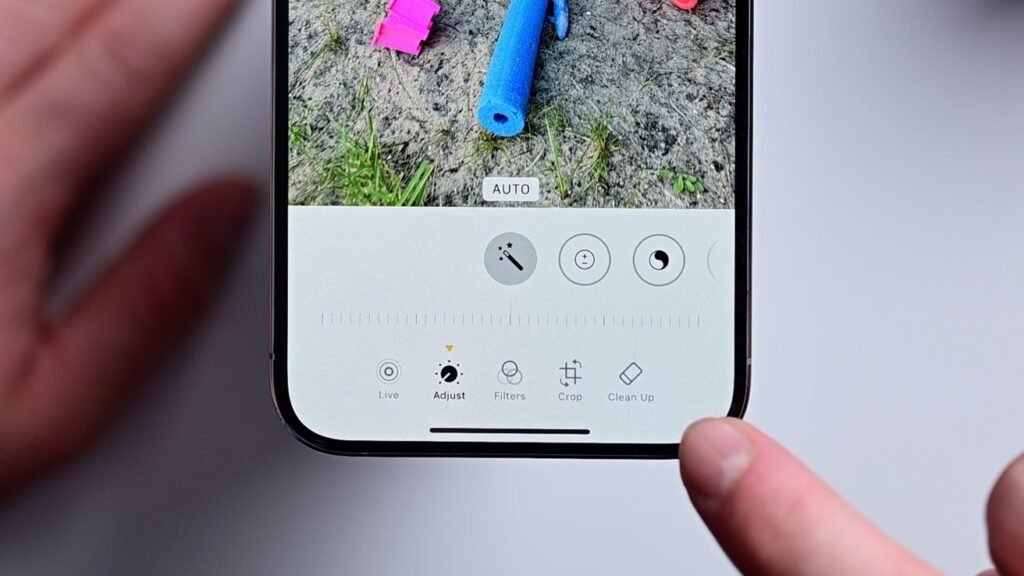
- At the bottom of the editing interface, tap the Clean Up tool icon, which is shaped like an eraser.
- The first time you use the tool, it will download the AI model to your device. All processing is done on-device for added privacy and security, ensuring nothing is sent to Apple’s servers.
Once active, the Clean Up tool will automatically analyze your photo for objects it suggests can be removed to enhance the image. These objects will be highlighted in vibrant, swirling colors for easy identification. Simply tap on an object, and the tool will remove it in seconds.
Performance Insights
We tested the Clean Up tool on various objects, including cars, people, and other elements. Most of the time, it delivered excellent results. However, it struggled slightly with larger objects or busy backgrounds, where the results could appear muddled. While it doesn’t offer the same capabilities as cloud-based tools like Google’s, the on-device processing is still remarkably effective.
Apple’s approach differs from competitors like Google, which often focus on “reimagining” photos by adding elements. Instead, Clean Up preserves the original intent of the photo, making subtle yet impactful improvements without creating fictional imagery.
Tips and Tricks for Using Clean Up
Here are some tips to make the most of the Clean Up tool:
- Beyond Suggested Edits: While Apple highlights certain objects for removal, you’re not limited to these suggestions. Tap on anything you’d like to remove, and Clean Up will outline its edges for precise editing.
- Custom Selection: Circle objects with your finger to manually select them for removal. A flash of colorful light indicates the object has been processed and erased.
- Zoom for Precision: Use pinch-to-zoom and pan across the image for detailed edits. This is especially useful for small removals, such as facial blemishes.
- Metadata Marking: After editing a photo with Clean Up, Apple adds metadata to indicate the use of AI. Photos will be labeled “Modified with Clean Up,” similar to images generated in Image Playground, to promote transparency and prevent misinformation.
- Blur Faces: To obscure someone’s face, simply circle it with the tool. The face will be pixelated, making it ideal for protecting privacy when sharing images online.
Supported Devices
The Clean Up tool is part of the first wave of Apple Intelligence features introduced with iOS 18.1. It is supported on the following devices:
- Apple Silicon Macs
- M-series iPads
- iPhone 15 Pro models
- All iPhone 16 models
Privacy and Security
All edits made with the Clean Up tool are processed on-device rather than through the cloud. This ensures your photos remain private and secure, though it may limit the tool’s performance on more complex scenes compared to cloud-based solutions.
Conclusion
Apple’s Clean Up tool is an impressive, user-friendly feature that makes photo editing quicker and more accessible. Whether you’re removing distractions from a landscape shot or touching up portraits, Clean Up allows you to enhance your photos while maintaining privacy and the original essence of the image.