How Prompted Motion Changes Creative Decision Making
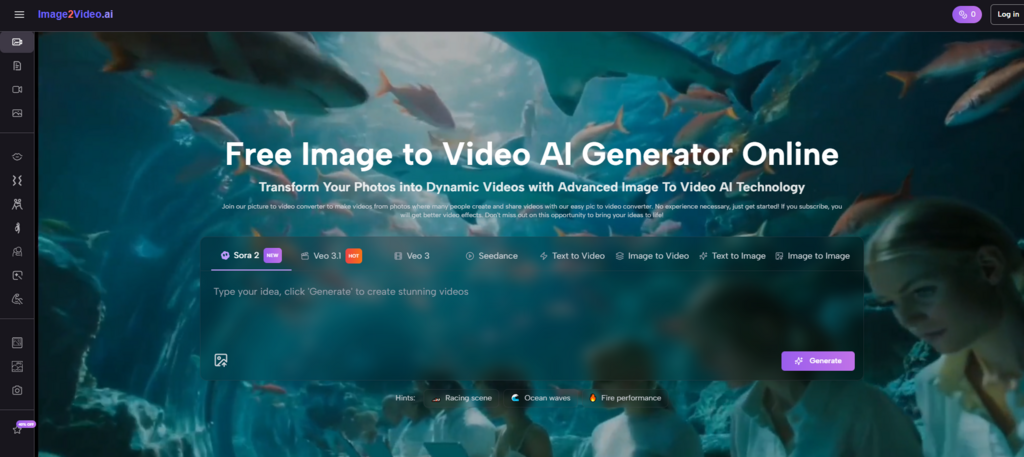
Image to Video AI is worth examining not only as a production tool, but as a sign that creative decision making itself is changing. For a long time, the process of making video required people to think in software procedures. They had to ask how to animate, how to cut, how to stage timing, how to layer effects, and how to structure a timeline. That logic placed technical operations at the center of the workflow. A tool like this suggests something different. It moves the center of gravity closer to intention.
That shift is more important than it first appears. When a creator starts with a still image and describes the desired motion in language, the creative task becomes less about manipulating a system step by step and more about expressing a visual outcome clearly. The tool does not remove craft, but it reassigns where craft begins. In my view, that is one of the most meaningful changes happening across AI-assisted visual creation.
Why Creative Work Is Becoming More Descriptive
The platform’s workflow reflects a larger trend in software design. Users increasingly interact with creative systems through natural language rather than through procedural control.
Language Now Carries More Creative Weight
When the user uploads an image and writes a prompt, the prompt is no longer a side note. It becomes the instruction set for how the visual should evolve. This changes the role of language in creative work. Words such as calm, dramatic, cinematic, drifting, energetic, or subtle begin to shape motion in ways that previously required direct manual control.
This Rewards Conceptual Clarity Over Technical Fluency
That does not mean technical knowledge has become irrelevant. It means the first layer of success may now come from knowing what should happen and how to describe it well. Many creators already possess that kind of clarity even if they do not know advanced editing software.
Intent Becomes a Form of Production Power
This is the deeper point. The more directly a system responds to intention, the more valuable visual judgment becomes. A creator with strong taste and clear mental imagery may achieve a useful result without needing to master a full animation toolchain first.
How the Official Workflow Embodies This Shift
The public-facing process shown on the platform is not accidental. Each step supports an intent-driven model of creation.
The Image Anchors the Visual Identity
The uploaded image provides the stable core of the output. This keeps the system grounded. The creator does not start from pure abstraction. They start from a frame with an existing composition, subject, texture, and emotional direction.
The Prompt Defines What Should Change
Once the image is in place, the prompt acts as the change request. What should move. How should the motion feel. Should the clip feel calm, dramatic, polished, atmospheric, or lively. This is where the user shifts from choosing a visual to shaping its behavior.
Behavior Matters as Much as Content
This is one reason tools like this feel aligned with modern short-form media. In many contexts, behavior is what makes content readable in motion-first environments. The same image can feel entirely different depending on whether the motion is subtle, aggressive, elegant, or playful.
Settings Translate Intent Into Output Conditions
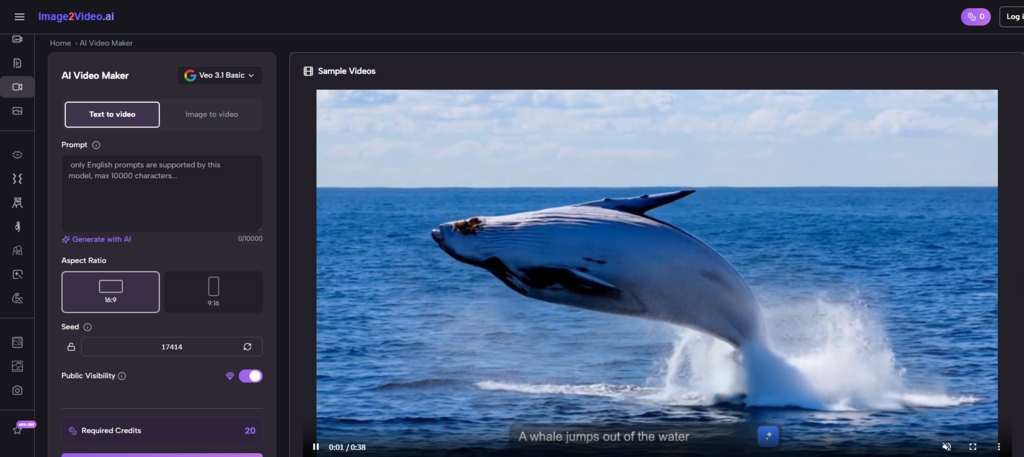
The visible controls on the generator page, including aspect ratio, frame rate, resolution, length, seed, and visibility, help convert a broad creative intention into a technically usable file. Without these settings, the prompt might remain too abstract. With them, the output becomes more deliberate and more aligned with where it will be used.
What Using the Platform Actually Requires
Although the interface looks simple, it still asks the user to make real decisions. Those decisions are just different from those required in older workflows.
Step One: Upload the Source Image
The process begins with a compatible image file, such as JPEG or PNG. This reveals that the tool is built for transformation rather than for fully original scene construction.
Step Two: Write a Prompt With a Clear Motion Idea
The prompt is the heart of the workflow. A vague prompt may lead to generic or unfocused movement. A more precise prompt gives the system a better chance of producing a result that matches the creator’s intention.
Step Three: Adjust the Key Output Settings
Before generation, the interface lets the user define practical conditions such as aspect ratio, length, frame rate, and resolution. These settings make the difference between a clip that simply exists and one that feels ready for a specific use.
Step Four: Generate, Review, and Refine if Needed
After processing, the result can be reviewed and exported. If the motion feels off, the creator can revise the prompt or settings and try again. In this sense, iteration shifts from manual adjustment to guided regeneration.
Why This Changes the Nature of Iteration
Traditional editing often involves making many small manual corrections. AI-assisted generation changes that pattern.
Iteration Becomes More Strategic Than Mechanical
Instead of dragging elements frame by frame, the user is more likely to ask whether the prompt reflects the right intention. Was the movement too dramatic. Was the mood too flat. Did the ratio fit the channel. Was the emotional pacing right. These are broader decisions, but they are still creative labor.
The User Moves Between Vision and Response
In my observation, this can make the process feel more conversational. The creator expresses intent, receives a result, compares it against the original mental picture, and refines the request. The work becomes less about manipulating parts and more about guiding behavior.
This Rewards Reflection During Generation
Creators who pause to think about why a result feels wrong often improve faster than those who only keep generating randomly. Because prompting sits at the center of the workflow, reflective iteration becomes especially important.
Where This Approach Is Most Valuable
The platform’s design makes it especially useful in situations where existing images already carry strong meaning and only need motion to become more effective.
Visual Storytelling Based on Mood
When the image already contains emotional direction, the tool can be used to explore how motion intensifies or reshapes that mood. The movement does not need to add new narrative information. It only needs to deepen the experience of the frame.
Fast Creative Prototyping
A still concept can be turned into a short moving test before larger production decisions are made. This is useful for creators who want to explore whether motion supports the idea before committing more time or budget.
Content Adaptation for Modern Platforms
Many images are not weak. They are simply static in environments that reward movement. A short generated clip can help them function better without replacing the original visual strategy.
One Image Can Support Many Interpretations
This is one of the most interesting byproducts of the workflow. Because the image remains constant while prompting changes, the same source visual can lead to different emotional versions. One motion direction may feel elegant. Another may feel energetic. A third may feel cinematic. That flexibility is creatively significant.
Later in the process, once a creator realizes that the challenge is not finding new content but helping existing content behave differently across channels, Photo to Video stops sounding like a narrow feature label. It starts sounding like a broader creative method: take a fixed frame and make it perform in motion.
How This Differs From Earlier Production Models
The platform changes both the tools and the questions being asked during creation.
| Creative Layer | Earlier Editing Model | Prompt-Led Platform Model |
| Main starting question | How do I build this motion? | What motion outcome do I want? |
| Core interface logic | Manual operations and sequencing | Language plus targeted settings |
| Primary user advantage | Technical editing skill | Visual intent and descriptive clarity |
| Type of iteration | Fine-grained adjustments | Regeneration and prompt refinement |
| Best asset starting point | Footage or project files | Still image |
| Strength in workflow | Precision control | Fast conceptual motion generation |
This comparison helps explain why the platform may appeal not only to beginners but also to experienced creators. It offers a different route to output. Sometimes the shortest path to a useful clip is not deep manual control, but clearly described intent.
Why the Limits Still Matter
No serious assessment should ignore the boundaries of the current workflow.
Prompt-Led Systems Can Misread Ambiguity
If the instruction is broad or contradictory, the result may feel uncertain or overly generic. The tool can help execute intent, but it cannot fully replace the user’s responsibility to articulate that intent well.
Short Outputs Define the Use Case
The current visible setup points toward brief clip generation. This makes the platform well suited to short-form publishing, concept tests, and light motion storytelling, but less obviously positioned for long-form edited sequences.
Iteration Is Easier, Not Unnecessary
A prompt-based workflow does not guarantee that one attempt will be enough. In fact, because generation is fast, users may go through several versions before landing on something that feels convincing.
Taste Remains the Final Filter
That is why taste still matters so much. The system can produce movement, but it cannot decide whether the movement serves the image with restraint, whether the tone matches the creator’s intent, or whether the output fits the platform where it will appear.
What This Means for the Future of Creative Work
The larger importance of tools like this lies in how they reframe the relationship between idea and execution.
Creative Control May Keep Moving Upstream
As systems become better at turning description into output, more of the important work may happen before the software action begins. The creator’s concept, emotional judgment, and phrasing become more central.
Images Are Becoming More Fluid Assets
A still image no longer has to remain still just because it started that way. It can become a motion test, a social clip, a campaign variation, or a mood piece without requiring a full rebuild.
Software May Increasingly Respond to Vision Instead of Procedure
That is the most interesting shift of all. The platform reflects a world in which the creative interface becomes less about telling the machine what buttons to press and more about telling it what experience to produce. That does not remove discipline. It changes the form discipline takes. For creators who understand visuals well but do not want to spend their energy inside traditional editing systems, that change may prove deeply valuable.

Alexia is the author at Research Snipers covering all technology news including Google, Apple, Android, Xiaomi, Huawei, Samsung News, and More.