Linux Screen vs. Traditional Car Entertainment Systems

Remember when your car’s entertainment system felt cutting-edge the day you drove off the lot — only to feel hopelessly outdated two years later? Factory-installed infotainment systems age quickly, leaving drivers stuck with sluggish interfaces, limited app support, and connectivity that can’t keep pace with modern smartphones. It’s a frustration shared by millions of car owners worldwide, and it’s fueling a booming aftermarket upgrade industry.
Enter the Linux screen — a flexible, open-source alternative that’s quietly transforming how drivers interact with their vehicles. From high-resolution touchscreens to seamless smartphone integration, Linux-based car entertainment systems offer capabilities that most factory units simply can’t match. Whether you’re commuting daily or hitting the open road, the difference in experience is hard to ignore.
This article takes a deep dive into how Linux screens stack up against traditional car entertainment systems. We’ll break down the key differences in features, performance, and value, then walk you through practical installation guidance covering CarPlay setup and backup camera integration. If you’ve been considering an upgrade but aren’t sure where to start, you’re in exactly the right place.
The Rise of Aftermarket Entertainment: Why Linux Screens?
The automotive entertainment landscape has shifted dramatically over the past decade. As smartphones became smarter and connectivity expectations soared, factory-installed systems struggled to keep up. Car owners increasingly found themselves paying premium prices for vehicles equipped with infotainment units that felt outdated within a year or two of purchase. This gap between what drivers want and what manufacturers deliver has created a thriving aftermarket industry — and Linux screens have emerged as one of its most compelling solutions.
What is a Linux Screen System?
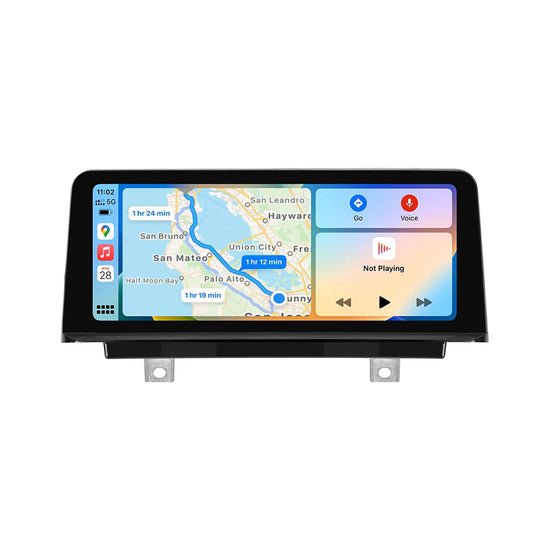
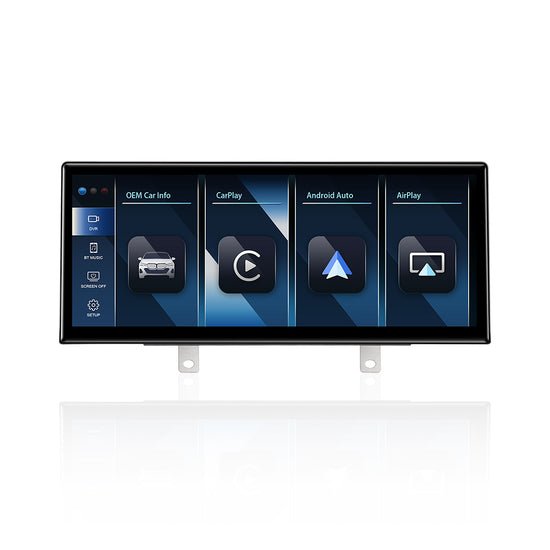
A Linux screen system is an aftermarket in-car display unit powered by the Linux operating system, an open-source platform renowned for its stability, flexibility, and developer-friendly architecture. Unlike proprietary factory systems locked into a manufacturer’s ecosystem, Linux-based units run on customizable software that can be updated, modified, and expanded well beyond original factory limitations. The hardware typically includes a high-resolution touchscreen, built-in Wi-Fi and Bluetooth, GPS capability, and support for multiple input sources. Because Linux is open-source, developers worldwide continuously contribute improvements, meaning these systems benefit from a constantly evolving feature set without requiring a new head unit purchase.
The Appeal of Aftermarket Upgrades
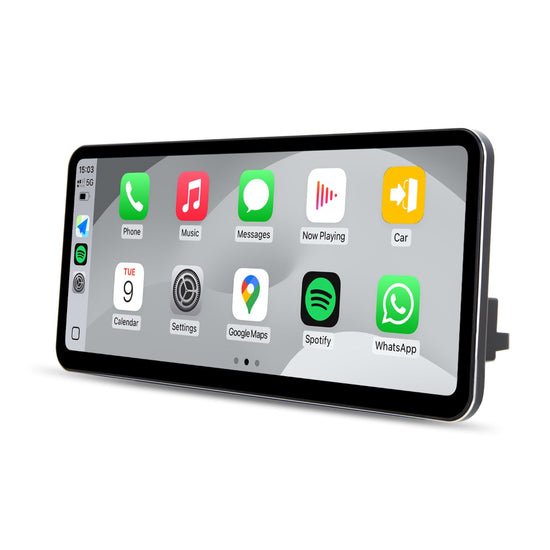
The push toward aftermarket entertainment upgrades isn’t just about chasing new technology — it’s a practical response to real frustrations. Factory systems often lack support for the latest apps, suffer from slow processors, and offer minimal customization. Car owners upgrading to Linux screens gain immediate access to modern connectivity standards, responsive interfaces, and features their original systems never offered. Cost-effectiveness plays a major role too. Rather than trading in a perfectly functional vehicle just to access a newer infotainment system, drivers can invest in an aftermarket Linux screen upgrade for a fraction of the cost, transforming their existing car’s interior experience without the financial burden of a new purchase.
Linux Screen vs. Traditional Systems: An In-Depth Screen Comparison
Choosing between a Linux screen and a factory-installed unit isn’t just a matter of preference — it’s a decision that affects every drive. A thorough screen comparison reveals meaningful differences across performance, interface design, and long-term usability that matter to everyday drivers.
Feature Comparison: Screen Quality and Interface
Modern Linux screens typically offer resolutions starting at 1080p, with many premium units reaching 2K or higher. Factory systems in mid-range vehicles, by contrast, often ship with 800×480 or 1280×720 displays that look noticeably dated next to a high-density aftermarket panel. Beyond raw resolution, touch sensitivity tells a significant part of the story. Linux-based units use capacitive touchscreens with multi-touch support, delivering the same fluid, responsive feel as a modern smartphone. Traditional factory units frequently rely on resistive or low-grade capacitive panels that require deliberate, firm presses — a frustrating experience when you’re trying to adjust navigation mid-drive. The user interface gap is equally stark. Linux screens support customizable launchers, widget-based home screens, and theme adjustments, while factory systems lock users into rigid, manufacturer-designed menus that can’t be meaningfully altered.
Connectivity and Integration: CarPlay and More
One of the most compelling arguments for upgrading is connectivity. Linux screens support both wired and wireless CarPlay installation alongside Android Auto, giving iPhone and Android users seamless access to maps, messaging, and music directly through the head unit. Brands like PEMP Car Audio have built their aftermarket lineup around this demand, offering units that prioritize stable wireless CarPlay performance as a core feature rather than an afterthought. Many factory systems — particularly those installed before 2018 — offer neither, or support only a limited, proprietary version of smartphone mirroring. Beyond smartphone integration, Linux screens typically include dual-band Wi-Fi, Bluetooth 5.0, and multiple USB ports, enabling simultaneous device connections without signal degradation. OTA (over-the-air) software updates keep the system current without dealership visits, a feature most traditional units simply don’t offer.
Cost and Value Analysis
Dealership infotainment upgrades can run anywhere from $500 to over $2,000, often tied to expensive trim packages. Quality aftermarket Linux screens deliver comparable or superior functionality at a significantly lower investment, with installation achievable as a DIY project. For drivers who want modern features without financing a new vehicle, the value proposition is difficult to argue against. The open-source foundation also means the system continues gaining features through software updates long after purchase, extending its useful life well beyond what any factory unit typically offers.
Practical Guide to Installation: CarPlay, Backup Camera, and Setup
Installing a Linux screen system is well within reach for anyone comfortable with basic automotive DIY work. The process involves a few distinct phases — preparation, head unit installation, CarPlay configuration, and backup camera integration — each of which becomes straightforward once you understand what to expect.
Pre-Installation Preparation
Before touching a single wire, gather the essentials: a trim removal tool set, wire stripper, electrical tape, zip ties, a multimeter, and the wiring harness adapter specific to your vehicle’s make and model. Check your new Linux screen’s compatibility with your car by verifying the dash opening size (most aftermarket units are single or double-DIN format) and confirming the unit supports your vehicle’s steering wheel control protocol. Download your car’s wiring diagram from the manufacturer’s service documentation or a reliable enthusiast forum — this single step prevents most installation mistakes. Disconnect the negative battery terminal before beginning any electrical work to eliminate the risk of short circuits.
Step-by-Step CarPlay Installation
Once the head unit is physically mounted and wired, CarPlay installation is primarily a software process. Power on the unit and navigate to Settings, then locate the CarPlay or Wireless Connectivity menu. For wired CarPlay, connect your iPhone via USB and accept the CarPlay prompt on your phone’s screen. For wireless CarPlay installation, enable Wi-Fi and Bluetooth on both devices, then select your phone from the unit’s pairing menu. If CarPlay fails to launch, verify that the USB cable supports data transfer rather than charging only, and confirm that CarPlay is enabled in your iPhone’s Settings under General. Restarting both devices resolves most initial pairing failures.
Integrating a Backup Camera with Your Linux Screen
Adding a backup camera dramatically improves safety and is simpler than most drivers expect. Run the camera’s video cable from the rear of the vehicle through the door seals or under the carpet toward the head unit, keeping it away from power cables to prevent interference. Connect the camera’s red trigger wire to the reverse light wire in your tail light assembly — this signals the Linux screen to automatically switch to the backup camera feed when reverse gear is engaged. In the head unit’s settings menu, navigate to Camera Input and set the trigger to Reverse Signal. Adjust the camera’s angle to display the full width of your rear bumper, then use the on-screen calibration grid to align parking guidelines accurately.
Common Installation Challenges and Solutions
The most frequent issue installers encounter is a no-sound output after wiring, almost always caused by a mismatched or incorrectly connected wiring harness. Double-check that the harness adapter is fully seated and that speaker wire polarity matches your vehicle’s configuration. If the touchscreen is unresponsive after mounting, the unit may be experiencing a ground loop — ensure the head unit’s ground wire connects directly to a clean metal chassis point rather than sharing a ground with another accessory. Software glitches like a frozen boot screen typically resolve with a factory reset accessible through the unit’s recovery menu, which won’t erase your CarPlay or camera settings if performed correctly.
Maximizing Your Upgrade: Benefits and Troubleshooting
Switching to a Linux screen system isn’t just a one-time improvement — it’s an investment that keeps delivering value over time. Understanding the full scope of benefits, knowing how to handle common hiccups, and following simple maintenance habits will ensure your upgrade performs at its best for years to come.
Key Benefits of a Linux Screen System
The most immediate benefit is customization. Linux-based systems let you tailor the home screen layout, install third-party apps, and adjust audio settings far beyond what any factory unit permits. Future-proofing is equally significant — because the platform is open-source, software updates regularly introduce new features without requiring hardware replacement. Safety improvements are tangible too: integrated backup cameras, real-time navigation through CarPlay, and hands-free calling reduce driver distraction in ways that older factory systems simply can’t support. For enthusiasts, the ability to connect OBD-II diagnostic tools directly through the head unit adds a layer of vehicle monitoring that transforms the dashboard into a genuinely useful information hub.
Troubleshooting Common Issues
Wireless CarPlay dropping intermittently is one of the most reported post-installation complaints. The fix is usually straightforward — navigate to the unit’s Wi-Fi settings and switch from 2.4GHz to the 5GHz band, which offers faster, more stable throughput for wireless mirroring. If the screen goes dark randomly, check that the ignition wire is connected to a switched power source rather than a constant live feed. Bluetooth audio cutting out typically points to interference from nearby electronics; repositioning USB devices or rerouting cables away from the head unit often resolves it within minutes.
Maintenance Tips for Longevity
Check for firmware updates every two to three months through the unit’s system settings — manufacturers regularly push stability patches and feature additions that keep performance sharp. Clean the touchscreen with a microfiber cloth and avoid harsh chemical sprays that can degrade the oleophobic coating over time. Periodically inspect all wiring connections for corrosion, particularly the ground wire, since a degrading ground is the root cause of many mysterious glitches that appear months after a clean initial installation.
Why Linux Screens Are the Smarter Upgrade for Modern Drivers
The gap between factory-installed infotainment systems and modern Linux screens has never been wider — or more worth acting on. Throughout this comparison, one theme emerges consistently: Linux-based aftermarket systems simply deliver more. Better display quality, genuine smartphone integration through CarPlay, responsive touch performance, and an open-source foundation that keeps improving long after installation day. Traditional factory units, by contrast, offer a fixed experience that ages quickly and offers little room for adaptation.
The practical side of upgrading is equally encouraging. With the right preparation, a compatible wiring harness, and a clear understanding of the CarPlay and backup camera setup process, most car owners can complete the installation in an afternoon. The troubleshooting guidance covered here addresses the most common hurdles, making the learning curve far gentler than it might initially appear.
If your current system leaves you frustrated with slow menus, limited app support, or a screen that can’t match the display in your pocket, an aftermarket Linux screen is a logical, cost-effective solution. You don’t need a new car to enjoy a modern driving experience — you just need the right upgrade. The technology is accessible, the installation is manageable, and the daily improvement to your time behind the wheel is immediate and lasting.

Alexia is the author at Research Snipers covering all technology news including Google, Apple, Android, Xiaomi, Huawei, Samsung News, and More.