Mastering Event Badge Printing: The Ultimate Guide to Smooth Check-In and Professional Registration
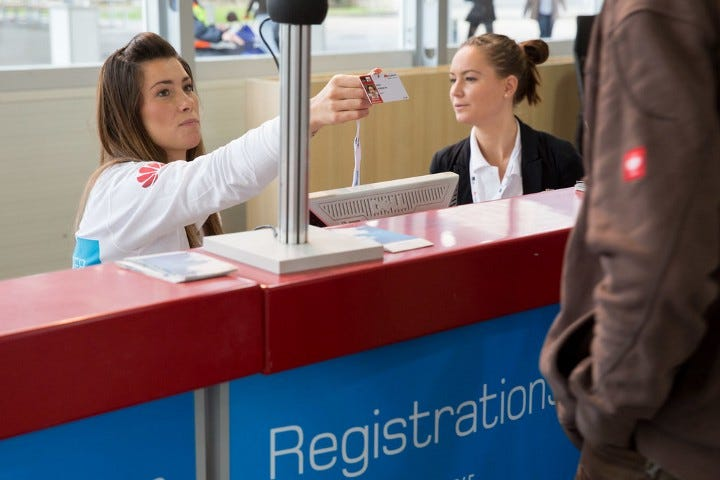
When it comes to hosting events, the check-in process sets the tone. If attendees are stuck in long lines or wrestling with confusing instructions, you’ve already lost part of their attention before the event even starts. Badge printing might seem like a small piece of the puzzle, but it plays a huge role in keeping things organized, professional, and stress-free—for everyone.
In this guide, we’re going to walk through the ins and outs of event badge printing. Whether you’re planning a small networking meetup or a full-scale conference, you’ll find tips, tools, and practical steps to make your registration process seamless.
Types of Badge Printing: What Works for Your Event?
Pre-Printed Badges
This option works best when your attendee list is finalized ahead of time. You print all badges in advance, sort them alphabetically or by company name, and have them ready to distribute. It’s low-effort on the day of the event, but it doesn’t allow for last-minute changes or walk-ins.
On-Site Printing
This is the go-to for larger or more dynamic events where people may register at the last minute or update their info on the fly. With on-site printing, attendees check in digitally, and their badge is printed right then and there—no delays, no fuss.
Hybrid Model
A combination of the two often makes the most sense. You can pre-print badges for key attendees like speakers or sponsors and use on-site printing for general admissions or walk-ins. This keeps lines short and your team flexible.
Designing Badges That Actually Work
Brand it Well
Your badge is part of your event’s first impression, so treat it like a branded asset. Stick to your event’s color scheme, use your logo, and include visual elements that align with the event’s theme. Keep it clean—less is more.
Personalize for Utility
Names, companies, job titles—these need to be front and center. Don’t bury the info in small text or overdo the graphics. If people can’t read someone’s name from a few feet away, it’s not doing its job.
Design for Function
Whether you’re including a QR code, RFID chip, or color-coded section for attendee types, make sure the badge layout supports quick scanning and easy recognition. And please—test your design before printing 500 of them.
Streamlining Check-In
Self-Service Kiosks
Self-check-in lets attendees scan a QR code or type in their name and print their badge without waiting in line. It’s quick, intuitive, and cuts down on staff requirements.
Assisted Check-In
Sometimes a little human help goes a long way. If your event has a lot of newcomers, VIPs, or tech-challenged guests, having staff on-hand to walk them through check-in is just smart.
Touchless Registration
Touchless systems—especially with QR codes or mobile badges—add a layer of safety and convenience. These systems work well for large-scale events or venues with high traffic where speed and hygiene matter.
Setting Up the Right Tech
Choosing the Right Printers
Thermal printers are workhorses—fast and reliable. Inkjet and laser printers deliver better visual quality, but they’re slower and need more maintenance. For large events, thermal is usually the way to go.
Device Compatibility
Whatever hardware you use—laptops, tablets, mobile check-in carts—make sure it’s tested and compatible with your software. Don’t assume it’ll all “just work” on event day.
Network and Power Needs
Reliable Wi-Fi is essential if your system relies on cloud syncing. It’s worth investing in a backup hotspot and a few surge protectors or battery packs in case power or connectivity becomes an issue.
Scaling for Events Big and Small
Whether you’re running a 50-person workshop or a 10,000-attendee trade show, badge printing has to scale. Smaller events might only need one station and a couple of pre-printed badges. Larger ones will need multiple kiosks, queue management, and roaming support staff. The key is to right-size your setup based on registration numbers, venue layout, and your staffing resources.
Smart Badge Features That Level Up Your Event
RFID and NFC
Adding RFID or NFC to your badges allows you to track session attendance, control access, and gather data about attendee behavior—without making anyone scan a barcode.
QR Codes
QR codes can be used for everything from lead retrieval to session check-ins. They’re easy to print, easy to scan, and integrate well with most event apps.
Sync With Event Software
Live syncing with your registration platform ensures real-time updates. If someone registers or updates their info last minute, the system reflects it immediately at check-in.
Badge Material and Layout Choices
What Should Your Badge Be Made Of?
Paper is budget-friendly and recyclable. Plastic is durable and looks sharp, but not great for the environment. More organizers are choosing biodegradable or recycled materials to cut down on waste.
Horizontal or Vertical?
Vertical badges are more space-efficient and easier to read when worn on a lanyard. Horizontal badges offer more design space. Choose based on how much information you need to display—and test visibility from a distance.
Don’t Forget the Accessories
Make sure you’ve got the right holders, clips, or lanyards. Pre-assembling badges can save serious time on-site, especially at high-traffic events.
Nailing the Logistics
Plan the Setup in Advance
Coordinate your hardware delivery, badge media, cables, and signage well before the event. Set it all up a day early if you can—and test everything.
Run Print Tests
Print real samples using the final data and design. Don’t skip this step. It’s where formatting errors, alignment issues, and barcode problems usually pop up.
Train Your Team
Even the slickest badge system can fall apart if no one knows how to use it. Make sure your staff or volunteers are trained and have access to simple troubleshooting guides.
Backup Planning (Because Tech Fails)
Printer Backup
Always have a spare printer. Always.
Network Redundancy
Have a local backup of your data or use systems that allow for offline badge printing if the internet goes down.
Support On-Site
Assign a dedicated tech support person or team to monitor the system. Don’t assume someone will “figure it out.”
Designing for Accessibility
Make sure badge stations are accessible to everyone. That includes wheelchair-friendly counters, clear fonts for readability, and simple instructions. Add staff support where needed to assist attendees with disabilities.
Making It Sustainable
Sustainability isn’t just a buzzword—it’s becoming a must. Reduce waste by printing only for checked-in attendees. Consider eco-friendly badge stock, reusable holders, and digital alternatives where possible.
Staying Secure
Keep personal data secure by limiting what’s printed on the badge. Use barcodes or QR codes instead of showing full contact details. For access control, use encoded RFID or scannable elements to manage permissions without handing out sensitive info.
Main Takeaways
A smooth badge printing process makes a strong first impression. Choose the right printing method based on your event’s size and flexibility needs. Don’t overlook badge design—make it branded, functional, and readable. Test your tech and train your team ahead of time. Plan for the unexpected, and keep things accessible, sustainable, and secure.
Frequently Asked Questions
What’s the best badge printing method for large events?
On-site thermal badge printing is usually the most efficient. It allows for real-time updates and fast processing.
Can I handle last-minute registrations easily?
Yes, as long as your system supports real-time syncing or allows walk-ins to check in and print badges quickly.
What’s the ideal badge size and layout?
A 4×6 vertical badge with a readable name font, QR code, and clean layout works well for most conferences.
How can I speed up badge pickup?
Use multiple check-in stations, set up clear signage, and pre-sort accessories. Digital instructions ahead of time also help a lot.
Do I need internet to print badges?
It depends on your system. Cloud-based platforms need reliable internet, but some printers and software can work offline with local data backups.

Alexia is the author at Research Snipers covering all technology news including Google, Apple, Android, Xiaomi, Huawei, Samsung News, and More.