Microsoft integrates AI campaigns directly into the Explorer
Microsoft integrates AI functions directly into the Explorer: In the future, users can edit images or summarize documents by right-clicking. The actions should improve the workflow and are part of the increased AI integration in Windows 11.
New AI features in Windows Explorer
Microsoft extends the Windows Explorer with AI-based functions that are available directly by right-clicking. The integration is intended to accelerate the workflow and enables the use of AI tools without having to open additional programs. With the new AI campaigns, users can edit their files more comprehensively, including images and documents.
The respective functions are designed in such a way that they integrate seamlessly into the work process and make AI tools usable without opening additional programs. Like Microsoft im Windows blog writes, the AI actions do not need a special Copilot+ PC and are available (after they have been provided in general) on all Windows 11 systems. This is quite remarkable, since Microsoft often requires more powerful PCs with copilot+ for many of his newer AI functions.
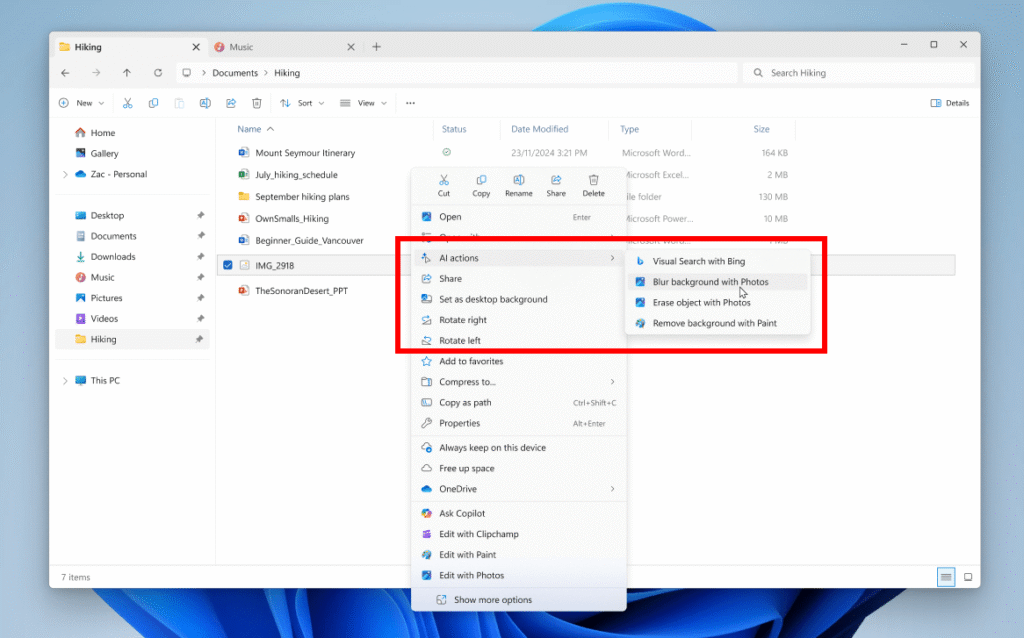
Image editing by right click
The first available functions include Bing Visual Search, background blur, object removal and removing the background. Users can access these functions directly in the Explorer context menu, which significantly simplifies the processing process. The system currently supports the image formats JPG, JPEG and PNG. In future updates, support is to be expanded to Microsoft 365 files, which enables additional functions such as document summary and FAQ creation.
The AI tools in the Explorer will then enable content to summarize and edit content. A new writing function in the editor will be able to create text from input requests. The editor will also support the AI-based summary of content and receive new formatting functions. In addition to the AI campaigns, the update to Windows 11 Insider Preview Build 26200,5603 brings with it: a new “Advanced” page in the settings, revised Windows widgets, an improved energy saving mode and the possibility of compressing images before sharing.