New start menu comes with annoying restrictions

Microsoft is currently testing its new start menu for Windows 11, which should finally offer a better overview of installed apps. However, despite a few clear improvements, a function is surprisingly missing that many users will be painfully missed.
New Windows start menu is coming
Microsoft is currently working on a comprehensive revision of the Windows 11 start menu. With an upcoming update for version 24H2, an XXL start menu is introduced, which should represent all installed applications more clearly. The innovation is intended to replace the multi -side presentation of the current start menu and instead offer a fully scrollable view.
The new start menu, which can currently be tried in a preview, presents users a scrollable page on which both attached apps and all installed applications can be found. One of the most striking changes is the new category view, in which apps are automatically sorted into different folders. These include, for example, “service programs and tools”, “productivity”, “entertainment” and “games”.
Automatic categorization
How Windows Latest Now reported, Microsoft has confirmed that users cannot create their own categories in the new start menu. Instead, programs that do not clearly fit into the given categories end up in the “other” folder. In addition, at least three apps must be present in the respective categories so that they are displayed at all.
If fewer apps of a category are assigned, they are also sorted into “other”. According to Microsoft, the categorization of the apps is controlled on the device via a local JSON file. This means that the assignment to categories is offline and no data is sent to Microsoft servers or AI systems. After all, this decision should look forward to data protection -conscious users.
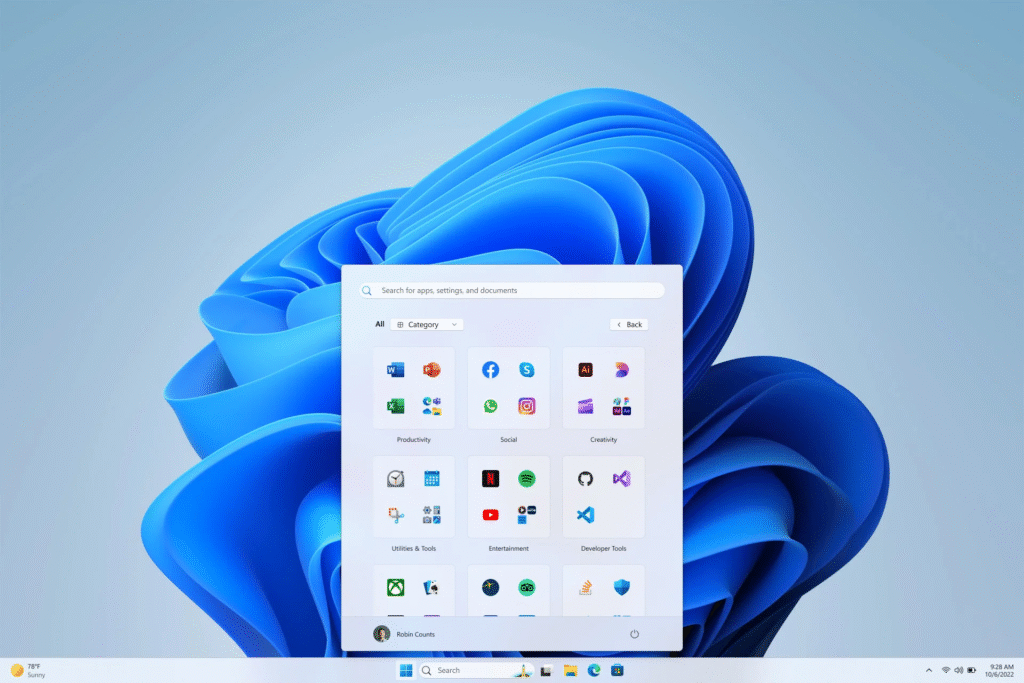
Nevertheless, users are denied the possibility of adjusting the automatic categorization or creating their own folders for their apps. This restriction should be particularly problematic for power users who want to optimize their work processes through individual organizational structures.
Further adjustment options
After all, the new start menu offers other adjustment options. In this way, the “recommended” area, which has so far been often criticized, can be completely deactivated. To do this, the corresponding options must be switched off in the settings under “Personalization”> “Start”. This function was a common point of criticism, since many users found the recommendations to be disturbing.
However, the decision not to allow custom categories is already criticized in the community. Many users want more adaptation options to design the start menu according to their own ideas. It remains to be seen whether Microsoft reacts to this feedback and improved in future updates.












