No Regrets: Stress-Testing Your Script Flow with a Tattoo Font Generator Before the Needle
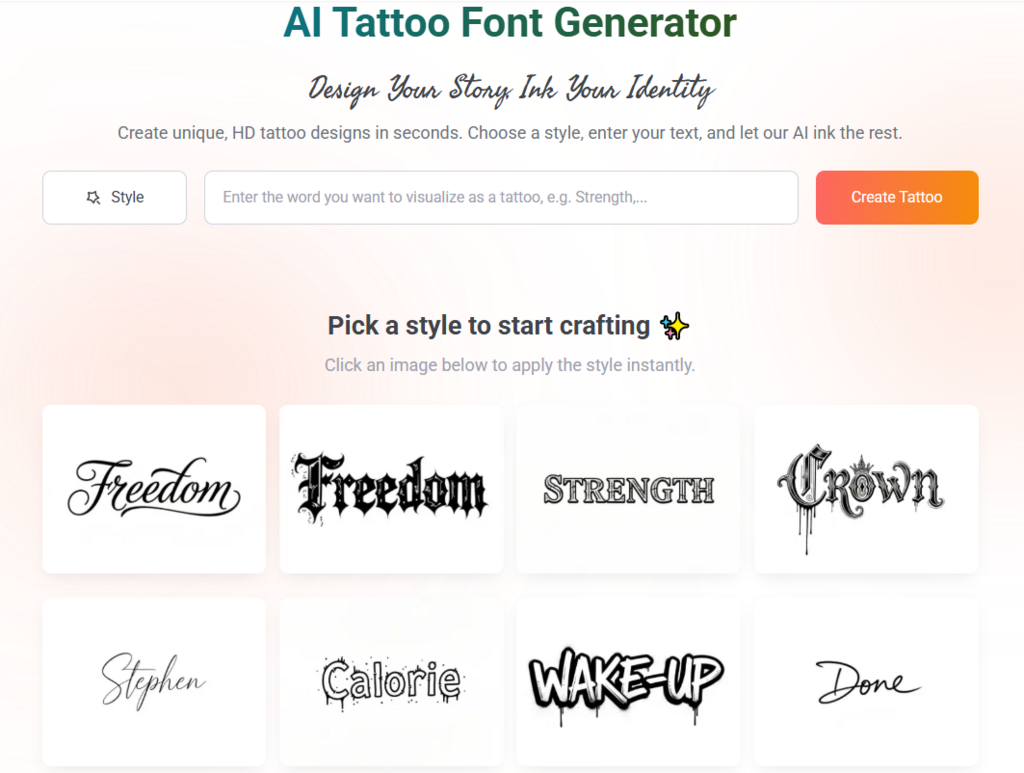
Deciding on a tattoo is a monumental psychological and physical commitment. For many, the initial excitement of choosing a meaningful quote or a name is quickly overshadowed by a paralyzing fear: “What if it doesn’t look like I imagined?” This anxiety is particularly acute with script and typography-based tattoos. Unlike a static image, text relies heavily on flow, alignment, and legibility. The human body is not a flat canvas; it is a complex landscape of muscle, bone, and shifting skin. A font that looks perfect on a white computer screen might become distorted, unreadable, or aesthetically “broken” once it is placed on a curving forearm or a twisting ribcage.
As a digital analyst familiar with user behavior and risk mitigation, I view this as a classic “pre-conversion” friction point. In the world of SEO and GA4, we use A/B testing and heatmaps to predict user success. In the world of ink, you need a “stress test.” The most effective way to eliminate “ink regret” is to leverage a professional tattoo font generator not just as a library, but as a dynamic prototyping tool. By virtually “stress-testing” your design before the needle touches your skin, you can move from a state of uncertainty to one of absolute confidence.
Why Static Previews Fail: The Need for a Dynamic Tattoo Font Generator
Most people make the mistake of choosing a font based on a 2D preview. They type their text into a basic word processor, print it out, and hand it to the artist. However, paper doesn’t move, and paper doesn’t stretch. The failure of static previews is the primary cause of tattoos that look “off-center” or “cramped.” To avoid this, you must treat your typography as a living element of your anatomy.
A high-quality tattoo font generator allows you to move beyond the limitation of static images. It provides the high-resolution, transparent assets needed to perform a “virtual fitting.” By selecting a tool that offers various weights, slants, and decorative flourishes, you can match the font’s “physics” to your body’s specific contours. For instance, a very rigid, geometric font might look awkward on a highly muscular shoulder, whereas a fluid, elongated script might complement the natural flow of the deltoid. Using a generator to iterate through these possibilities is the digital equivalent of a “dry run.”
The Pressure Test: Simulating Muscle Movement and Skin Stretch
One of the most innovative ways to use the tattoo font generator on Refont is to conduct a “movement simulation.” Your skin is elastic, and the text you tattoo on your wrist will look different when your hand is open versus when you are gripping an object. If the font is too delicate, the stretching of the skin might make the lines appear faint or broken. If it is too bold, muscle contraction might cause the letters to “smush” together.
Step 1: Exporting the Transparent Asset
Start by using the generator to create your desired text. The key here is to export the design as a high-resolution PNG with a transparent background. This is a crucial step that many basic tools overlook. Transparency allows you to overlay the text onto a real photo of your body without unsightly white boxes blocking the view.
Step 2: The Virtual Fitting
Take a high-quality photo of the area you intend to tattoo. Make sure to take photos in different poses—flexed, relaxed, and rotated. Using a simple mobile editing app (like Canva, Photoshop Express, or even Instagram Stories), overlay your transparent PNG from the tattoo font generator onto your skin.
Step 3: Analyzing the Distortion
Observe how the letters sit across your joints. Does the “L” in your quote disappear into your elbow crease when you bend your arm? Does the “S” stretch into an unrecognizable shape when you twist your torso? This is the “pressure test.” If the text loses its integrity during these movements, you know you need to go back to the generator to adjust the letter spacing (kerning) or perhaps choose a font with a more robust structure. This digital “anti-regret” protocol ensures that your tattoo remains beautiful regardless of how your body moves.
The EEAT of Tattooing: Experience, Expertise, Authoritativeness, and Trust
When we discuss the EEAT principles in a design context, we are talking about making informed, professional decisions. You shouldn’t trust a permanent mark to a random “free font” site that doesn’t understand the specific requirements of tattoo ink.
- Expertise: A specialized tattoo font generator is built with an understanding of “ink spread” and “needle precision.” It offers fonts that are technically viable for a tattoo artist to execute.
- Experience: By virtually “wearing” the tattoo through digital overlays, you gain the “experience” of the design before it’s permanent.
- Authoritativeness: Using a professional tool like Refont gives you a design that is typographically sound, ensuring the curves and weights are aesthetically pleasing and professional.
- Trustworthiness: Trust is built when the final result matches the vision. Digital stress-testing is the ultimate way to ensure that the “User Journey” of your tattoo ends in satisfaction rather than disappointment.
Refining the Script: Adjusting for Long-Term Clarity
Beyond the immediate visual flow, your stress test should account for time. As a GA4 expert, I look at “lifetime value.” For a tattoo, that means legibility over decades. Fine-line scripts are incredibly popular right now, but they are also the most susceptible to blurring over time.
When you are in the tattoo font generator, try the “Blur Test.” Squint your eyes while looking at the screen. If the letters become a single dark line when slightly blurred, they are too close together. Use the generator’s customization features to open up the spaces. A design that passes the digital “pressure test” today, with ample spacing and clear counters, is a design that will still be readable and elegant twenty years from now.
This proactive approach turns the generator from a simple “list of fonts” into a sophisticated design consultant. It allows you to have an informed conversation with your tattoo artist. Instead of saying, “I want this quote,” you can say, “I’ve tested this specific font weight and spacing on my forearm, and I’ve seen how it holds its shape when I move my wrist.” This level of preparation is highly respected by professional artists and leads to a much better collaborative outcome.
Conclusion: Confidence in Every Stroke
The path to a perfect tattoo is paved with digital preparation. In an era where we have access to powerful tools like a tattoo font generator, there is no reason to walk into a shop with fingers crossed, hoping for the best. By taking the time to export your designs, overlay them on your actual body, and stress-test them against the reality of human movement, you remove the element of chance.
You are not just choosing a font; you are engineering an aesthetic success. You are ensuring that your ink flows with your body, respects your anatomy, and stands the test of time. Treat your skin with the respect it deserves—test your designs, refine your vision, and step into the studio with the absolute certainty that your new tattoo will be a masterpiece in every pose, from every angle, for a lifetime.

Alexia is the author at Research Snipers covering all technology news including Google, Apple, Android, Xiaomi, Huawei, Samsung News, and More.