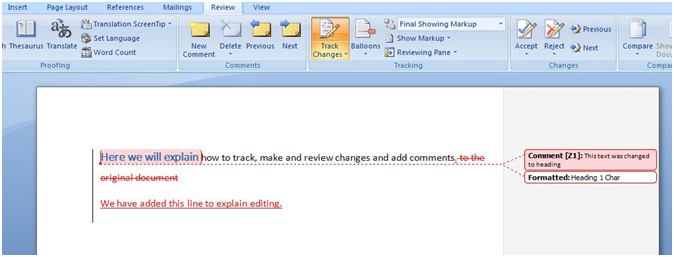
“Track changes” in Ms Word is a useful feature which allows users to review and track any changes which have been made to the original document. This feature is very useful in a team environment where multiple users are able to make and review changes, leave comments and edit documents before their final layout. A simple guide to use this feature is given below using snapshots.
1- Start using
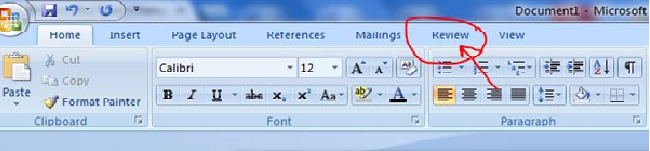
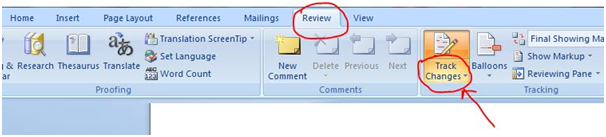
Start using the feature by clicking the review tab on the ribbon as shown above and below in the pictures.
2- Turning the feature on and off
After clicking on the review button click on track changes and select the first option of track changes from drop down menu. This will enable the user to start tracking of the revisions made to the document. Make sure to turn on the feature before editing or making any changes to the original document.
3- Editing or making changes to the original document
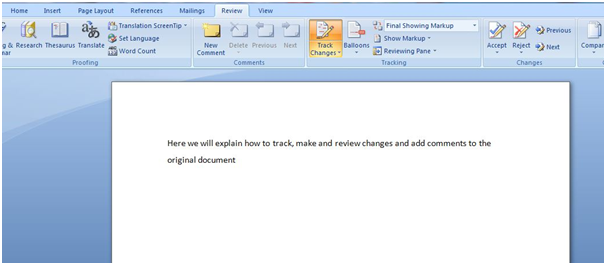
Above the original document is shown and track changes feature is enabled where any future changes that are being made to the document will be tracked.
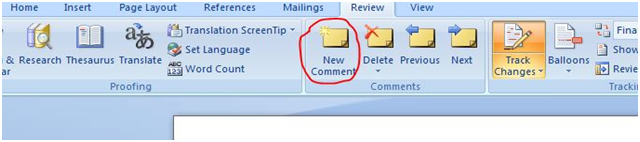
While editing, formatting and adding new text to the document comments can be added by clicking on new comment button, comments can also be deleted by clicking on the delete button next to the new comment.
4- Review changes
Tracked changes can be viewed in different ways by clicking on balloons tab and selecting the view and by clicking on final showing mark-up which has a drop down menu.
5- Finalising
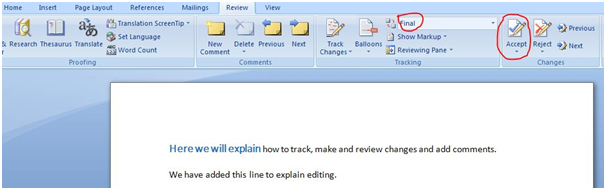
After reviewing the changes, comments and formatting an author may accept or reject changes by clicking accept or reject button. The above document is finalised by clicking accept changes button and by choosing final option from the final showing mark up drop down menu.
Note: This guide of track changes explains features particularly in MS Word 2007, which may be different in other versions of MS Word. But it works in the same way in all upgraded versions of Microsoft Word
Image credit: cio.comDigital marketing enthusiast and industry professional in Digital technologies, Technology News, Mobile phones, software, gadgets with vast experience in the tech industry, I have a keen interest in technology, News breaking.
If you've never used one before, the term data room can sound more intimidating than…
High price, too much weight and a narrow niche: the Vision Pro headset forces Apple…
US President Donald Trump has ordered a new emergency regulation for the power grid. It…
Huawei has officially launched the sale of the Watch GT 7 Pro in China, introducing…
Apple is considering the potential to transform its future smart glasses into health and fitness…
Everyone has parts of their past they'd handle differently if given another chance. Maybe you…