Reference Packets Prevent Prop Drift Across Generated Clips
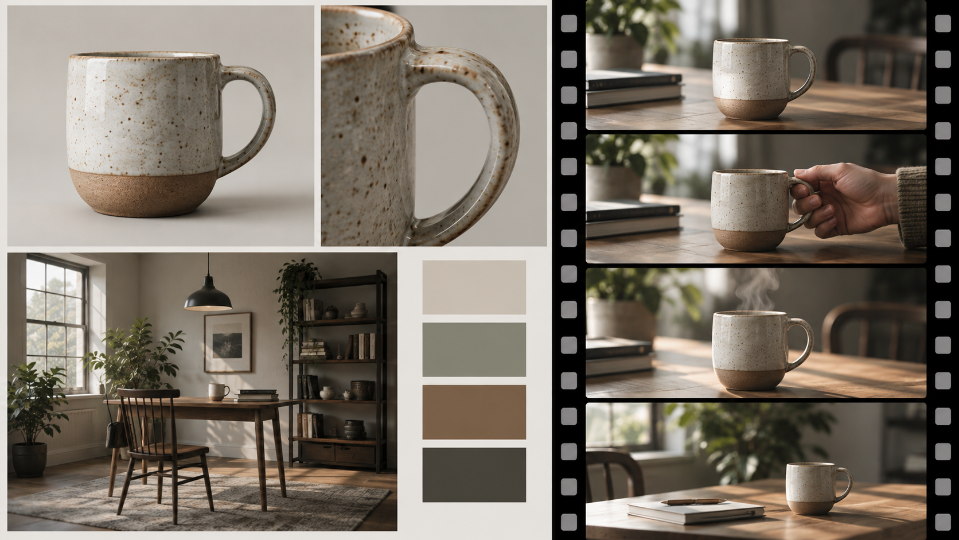
A connected set of generated clips can lose continuity in ordinary objects. A mug changes handle shape, a phone gains an extra camera, and a desk layout flips between shots. Viewers may not name the error, but the sequence feels synthetic. The answer is not a folder full of references. It is a small packet where every image has one declared job.
An AI video tool can route a prompt through models presented on AIVideoEditor.me, including image-led options. The site also separates model costs and plan features. Before comparing price or polish, test whether a reference packet actually reduces drift in the prop and space that connect the clips.
Build A Four Item Reference Packet
Keep a clean subject view, a prop close-up, a wide location view, and a simple color reference in the production folder. This is an editorial reference packet, not a claim that every generation route accepts four simultaneous uploads. Remove duplicates. Each file should answer a different question. If two images disagree about the phone color or table position, resolve that conflict before generation rather than asking the model to choose.
Label The Job Of Every Source
Name files by function: subject-front, prop-detail, room-layout, and grade-reference. Before using an AI video editor, add one sentence explaining what each reference should preserve. This prevents a moody lighting reference from accidentally controlling object geometry and stops the wide room photo from becoming the face reference.
Write A Detailed Prop Geometry Sheet
Record the object’s silhouette, material, color, distinctive parts, and scale relative to the subject. For a phone, note the camera arrangement and case. For a mug, note handle side and rim shape. The sheet becomes the review baseline after motion makes small differences harder to spot.
Add a front, side, and top cue only when the sequence will reveal those views. The packet should describe what the camera can actually expose, not become a full product archive. Mark details that are allowed to disappear through occlusion and details that must remain consistent when they return. This distinction prevents reviewers from calling every hidden edge a continuity failure.
| Reference | Controls | Must not control |
|---|---|---|
| Subject front | Identity and wardrobe | Room layout |
| Prop close-up | Shape and material | Color grade |
| Wide room | Door and desk positions | Face detail |
| Grade swatch | Palette and contrast | Object count |
Four purposeful sources are easier to audit than a crowded moodboard. Where the selected route accepts separate references, they also support a comparison with one input removed.
Compare Full Packet And Missing Reference Runs
First check the inputs accepted by the selected AIVideoEditor.me route. If it supports the required separate references, generate a control clip and repeat with only the prop close-up removed. If it accepts just one source image, keep the packet for human review and compare two approved source frames instead. Do not compare clips made from different actions or camera moves. The difference reveals whether that reference improves the item the team cares about.
Save both outputs with the prompt, route, and generation settings. Random variation means one pair cannot prove a universal rule, but it can reveal a clear failure worth investigating. If the missing-reference run changes the handle side while the full packet does not, repeat the pair before adding more source images. Replication is cheaper than rebuilding the packet around one lucky result.
Keep Prompt Action And Camera Fixed
Use one observable event, such as the subject placing the mug beside the laptop while the camera stays locked. Protect subject, prop, desk, doorway, and light direction. When you edit videos online, changing one supported input at a time makes the comparison easier to interpret.
Inspect First Middle And Last Frames
Continuity can hold at the opening and fail during motion. Compare the prop at three points. Check handle side, reflections, edge count, scale, and contact with the hand or table. A good final frame does not erase a broken middle that viewers still see.
Inspect the join between clips as well as each clip alone. Place the last accepted frame beside the first frame of the next shot and align the shared object. Differences in lens perspective may be intentional, but a new silhouette, material, or component is not. Note the exact frame where the identity resets so the revision can target one transition.
Record Which Reference Earned Its Place
If removing a source produces no visible change, keep the smaller packet. Extra references can introduce conflicting cues and increase review work. AIVideoEditor.me may offer model routes with different reference behavior, so repeat the test when the chosen route changes rather than assuming the packet transfers unchanged.
Score Prop Geometry Across Every Clip
Lay connected clips on one timeline and inspect the shared prop before discussing cinematic quality. Mark shape, material, scale, side, and position as pass or fail. Then check room geometry and lighting. This order keeps a dramatic camera move from distracting reviewers from a phone that changed between shots.
Use a compact scorecard rather than an average quality number. A prop can pass color and position while failing the camera arrangement that identifies it. Treat protected features as gates: one broken defining detail sends the clip back, even if less important attributes score well. Record optional qualities separately so the team knows which improvements can wait.
Reject A Clip With An Identity Reset
If the prop or subject needs to be explained as “close enough,” the sequence has reset identity. Return to the last accepted frame, simplify the action, or provide a cleaner source. Repeated patching can introduce new drift elsewhere, so preserve the strongest earlier version.
Keep Exact Measurements Outside Generated Frames
A reference can support visual scale but cannot certify dimensions. Product measurements, interface labels, and performance numbers should remain editable overlays or conventional footage. The generated clip demonstrates a scene; it does not become a technical specification.
When an exact feature must be shown, combine generated establishing material with a verified product shot instead of asking one clip to do both jobs. Match color and pacing in the edit, but preserve the factual close-up unchanged. This hybrid cut keeps creative motion around the product without turning generated geometry into evidence.
Archive the accepted packet with a contact sheet from every approved clip. Future editors can compare a new scene against the same defining details without reopening old project files. If the product design changes, start a new packet instead of mixing revisions. Version boundaries keep a deliberate update from looking like accidental drift.
Finally, review the sequence once at normal speed after the frame checks. Technical continuity matters because it lets attention remain on the story, not because every frame must be identical. If viewers notice the prop only when it changes, the packet and review process have done their job.
Choose The Smallest Packet That Holds Continuity
AIVideoEditor.me fits teams willing to test reference roles before producing a series. It is less suitable when conflicting source images remain unresolved or when exact engineering geometry must be guaranteed.
Keep a small production packet, test only the reference inputs supported by the chosen route, and inspect the prop throughout each clip. Retain a source only when its role is clear. It is the smallest set that keeps the same object recognizable while the scene finally gets to move.

Alexia is the author at Research Snipers covering all technology news including Google, Apple, Android, Xiaomi, Huawei, Samsung News, and More.