Why Professional Traders Use 6-Monitor Setups
Key Takeaways
- Research shows traders using three or more monitors execute trades 27% faster than those on single screens – and six-monitor setups push that advantage further by eliminating all window-switching from the workflow entirely.
- The six-monitor setup is not about having more screens – it is about having a dedicated, permanently visible home for every category of data that influences a trading decision.
- Traders with expanded visual data access identify market shifts 2-3 minutes faster than those on constrained setups, according to trading efficiency research – a meaningful edge in fast-moving sessions.
- The 3×2 grid is the most effective physical configuration for a six-monitor array: three screens on top, three below, with the primary chart and execution platform centered at eye level.
- Screen count alone does not create the advantage – it is the fixed assignment of each screen to a specific data role, maintained consistently across every session, that builds the spatial workflow memory that makes a six-screen desk feel effortless.
When I first saw a six-monitor trading desk, my honest reaction was that it was overkill. Six screens felt like a statement more than a tool – the kind of setup you build to look serious, not to trade seriously. I held that opinion for longer than I should have. Then I spent a week trading on one.
The shift was not dramatic. It was quieter than that. I just stopped doing something I had always done – toggling, minimizing, hunting for windows – and I did not notice the absence until I went back to a smaller setup and felt the friction return. That is the thing about a well-organized six-monitor desk: you do not feel what it gives you. You feel what you lose when it is gone.
Here is what I understand now about why professional traders land on six monitors, how they actually use them, and what the upgrade means in practice.
The Core Problem: Trading Data Does Not Fit on One or Two Screens
Active trading requires simultaneous access to more data categories than any two-screen setup can comfortably hold – and the moment you start minimizing windows to fit everything, you start losing information you paid for.
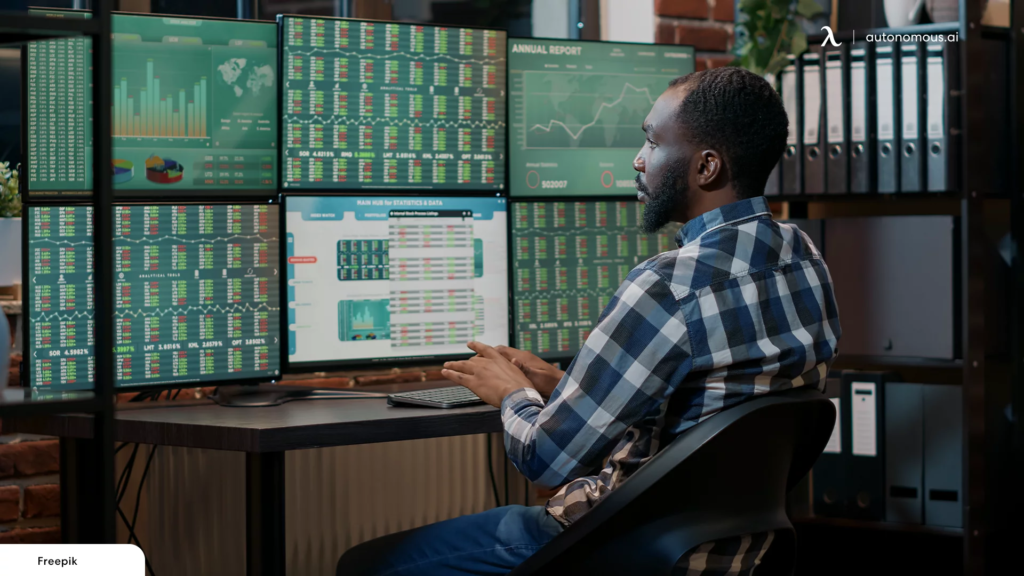
Think about what a full trading session actually demands at once. A primary chart for the main instrument. A secondary chart for a correlated asset or a different timeframe. A Level 2 order book or order flow display. A real-time market scanner showing what is moving right now. A news feed or economic calendar. A broker execution platform with open positions and P&L. That is six distinct data categories, each one active and updating continuously, each one potentially relevant at the moment a setup develops.
On two screens, you have two of those visible at any time. The others are in minimized windows you toggle to on demand. The problem is that “on demand” means you are only looking at them when you think to look. You are not monitoring – you are checking. And the data you are not actively watching is exactly where the information you missed was hiding.
A US patent on display management for trading workstations put it plainly: a single monitor forces traders to “flip between windows,” and “the time it takes to flip does not make the single monitor the most optimal trading workspace solution.” Multiple monitors exist to eliminate that flipping entirely. Six monitors is the configuration where the elimination becomes complete.
What Each of the Six Screens Actually Does
The value of a six-monitor setup comes entirely from how deliberately each screen is assigned. Six screens with no role structure is just a cluttered desk at scale. Six screens with a fixed, intentional layout is a trading environment where every piece of information has a permanent address.
This is the layout that most professional active traders converge on, through some variation:
Screen 1 – Center, top or center position: Primary chart for the main instrument. The highest-resolution monitor in the array. This is where the trade decision forms. It never shares space with anything else.
Screen 2 – Left of center: Secondary chart – either a correlated instrument (S&P 500 while trading individual equities, DXY while trading forex pairs), a macro index, or a higher-timeframe view of the same instrument. Context for Screen 1.
Screen 3 – Right of center: Execution platform and open positions. Order entry, current fills, P&L tracker, and position management. Always visible, used less frequently than the analytical screens, but always accessible without searching.
Screen 4 – Far left or top-left: Real-time scanner and watchlist. What is moving right now, what is setting up, what is hitting scan criteria. The opportunity identification layer running in the background throughout the session.
Screen 5 – Far right or top-right: News feed, economic calendar, earnings releases. Macro and catalyst awareness. The screen that tells you why something is moving before you make a decision based only on how it is moving.
Screen 6 – Below center or second row center: Order flow, Level 2, time-and-sales, or a volume profile display. The liquidity-reading layer that provides the real-time execution context that price charts alone cannot give.
What matters is not this specific layout – every trader adjusts it to their instruments and style. What matters is that each screen has exactly one job, and that job never changes. After a few weeks of trading on a fixed six-screen layout, the trader stops thinking about where to look. The eye goes there automatically, the way a driver’s eye goes to the mirrors without deliberate decision.
The Spatial Memory Effect: Why Consistency Matters More Than Screen Count
Here is the part that I think most explanations of multi-monitor trading get wrong: the performance gain from six monitors is not mainly about having more data visible. It is about building spatial memory for where each data type lives.
When you use the same screen layout every session, you are training a spatial habit. Your peripheral vision starts monitoring the scanner screen without requiring active attention. Your eye checks the news screen at certain moments – opening bell, approaching economic data release, unusual volatility – without a conscious decision to check. Your brain learns the geography of the desk the way a musician learns the geography of their instrument.
On a two-screen setup, you cannot build this spatial memory because the layout is always shifting to accommodate whatever you are trying to fit. You are always deciding where to look. On a well-organized six-screen desk with consistent screen assignments, you stop deciding. The information finds your attention instead of your attention searching for the information.
This is what traders mean when they describe a large multi-monitor setup as “quiet.” Not that it has fewer things happening – it has more. But the cognitive overhead of finding information drops to near zero, which means more mental bandwidth is available for actually analyzing what you are looking at.
Professional Tips for Getting the Most from a Six-Monitor Setup
Over time, the traders who perform best on large multi-monitor setups tend to share a few specific practices:
Tip 1 – Fix your layout and do not move it. The temptation when you first get six screens is to keep rearranging. Resist it. Choose a layout that reflects your actual data priorities – primary analysis centered, execution accessible without being dominant, peripheral monitoring at the edges – and leave it alone for at least a month. The spatial memory only builds if the geography is stable.
Tip 2 – Give each screen one job, not two. Splitting a screen between two data categories defeats the purpose. The moment you need to look at that screen, you also need to decide which part of it to read. A screen that holds only one data type removes that micro-decision.
Tip 3 – Put your execution platform off-center, not at the center. New traders instinctively center their broker platform. Experienced traders center their primary chart. The analysis drives the trade; the execution is the last step. Position the execution screen where it is easy to reach but not where it dominates your resting gaze.
Tip 4 – Match your monitor specs to the role of each screen. Your primary chart deserves your best monitor – highest resolution, best IPS panel, highest refresh rate. Secondary screens doing less demanding visual work can run at 1440p without the experience degrading. Matching the hardware to the role saves money and ensures your best display is doing the most important job.
Tip 5 – Use monitor arms, not stands. A six-screen array on separate bases creates a cluttered, misaligned desk where no two screens sit at exactly the same height. Monitor arms let you set every screen to a consistent center height, angle the side monitors inward at 15-20 degrees, and free up the desk surface below. The physical alignment matters – a screen at the wrong angle introduces subtle neck strain that compounds across a full session.
Tip 6 – Build the third row before the second one if you add gradually. If you are scaling from four monitors to six, many traders find that adding the fifth and sixth screens in a second row (below the existing four) works better than extending the horizontal line. The 3×2 grid keeps everything within a narrower arc of head movement than a linear six-screen row does.
A 6-monitor trading setup built with matched displays, quality arms, and consistent spacing is meaningfully different from six assorted monitors on mismatched stands. The difference is not aesthetic – it is ergonomic and functional. Consistent viewing angles, consistent resolution, and proper weight-rated arms that hold position all day are the physical prerequisites for the setup to actually perform as described.
Do You Actually Need Six Monitors?
Honestly – not everyone does, and being straightforward about this is more useful than assuming the answer is always yes.
A swing trader holding positions for days and monitoring a watchlist of twenty stocks does not need six monitors. A dual or triple screen setup covers that workflow without the overhead. A part-time trader working off a laptop with an external monitor can operate effectively at that scale.
Six monitors earns its place for the active day trader who is simultaneously tracking multiple instruments, monitoring order flow, staying aware of macro data and news catalysts, running a scanner, and managing open positions – all during a fast-moving session. That is the workflow where every screen has a job to fill from the moment the market opens to the close, and where the absence of any one data category costs entries.
The honest rule of thumb: if you are regularly finding yourself toggling to a minimized window at a moment when you needed the information that was in it, you are undersized. If your current screens all stay open and visible throughout the session without overlap or competition, you are not.
Frequently Asked Questions
Why do professional traders use so many monitors?
Professional traders use multiple monitors to keep every critical data category permanently visible – charts, order flow, news, scanners, and execution platforms – without minimizing or switching windows. Research shows traders using 3+ monitors execute trades 27% faster than single-screen users. Six monitors is the configuration where that advantage reaches completion: nothing is hidden, nothing requires hunting for.
Is a 6-monitor setup overkill for a retail trader?
It depends entirely on how complex the workflow is. For active day traders tracking multiple instruments, running scanners, monitoring order flow, and managing open positions simultaneously, six monitors is a workflow tool, not a luxury. For swing traders and part-time traders with narrower data needs, four monitors or fewer is usually adequate. The test is whether your current screens can all stay open simultaneously without overlap.
What is the best physical layout for six monitors?
The 3×2 grid – three monitors on top, three below – is widely regarded as the most ergonomic configuration because it keeps all screens within a moderate arc of head movement. The primary chart and execution platform sit at center, analysis screens flank them, and peripheral monitoring tools occupy the outer and lower positions. All screens should share the same vertical center-point height, with side monitors angled 15-20 degrees inward.
What size monitors work best for a 6-screen trading setup?
27-inch monitors provide the best balance between screen area and practical desk footprint for a six-screen array. 32-inch panels can work well as the primary center screen but make a full six-screen horizontal arrangement impractical on most desks. Consistent sizing across the array is more important than maximizing individual screen size – mismatched displays create visual discontinuity that undermines the spatial workflow the setup is designed to build.
Does monitor quality matter on secondary screens?
Yes, but differently than on the primary. Secondary screens benefit most from IPS panel technology – which maintains color and brightness accuracy across the viewing angles that side screens inevitably create – and from resolution high enough to display data at comfortable text sizes. 1440p is the practical minimum on secondary screens. The primary monitor warrants the most investment in resolution, refresh rate, and panel quality because it is the screen where the most time-sensitive analysis happens.
How long does it take to adapt to a 6-monitor layout?
Most traders report feeling natural on a fixed six-screen layout within two to four weeks of consistent use. The first few days involve adjustment – the peripheral screens feel unfamiliar and the tendency to use only the familiar central screens is strong. The spatial memory that makes large setups feel effortless builds through repetition, which is why fixing the layout early and not rearranging it is so important.
Conclusion
Six monitors is not a destination for every trader, but for the ones it fits, it is genuinely transformative – not because it provides more data, but because it provides that data without the friction of searching for it. The professional traders who build six-screen setups are not chasing status. They are eliminating the one remaining source of latency in their workflow that no faster computer or better internet connection can address: the time between needing information and seeing it.

Alexia is the author at Research Snipers covering all technology news including Google, Apple, Android, Xiaomi, Huawei, Samsung News, and More.