Offline Sync vs Premium Features in Web Based Time Clocks
Every small business owner knows the frustration: an employee clocks in but the system glitches, the internet drops during shift change, or you discover at payroll time that hours of attendance data simply vanished. Time tracking should be the simplest part of running a business, yet unreliable systems turn it into a recurring headache that costs both money and morale.
When evaluating web based time clocks, small business owners face a fundamental dilemma. Do you invest in robust offline sync capabilities that guarantee your attendance tracking never fails, even without internet? Or do you prioritize premium features—advanced reporting, geofencing, payroll integrations—that promise to streamline operations and fuel growth? The answer isn’t always straightforward, and choosing wrong can mean wasted budget or persistent operational gaps.
This article breaks down both sides of that equation. We’ll compare offline sync functionality against premium feature sets, examining cost, reliability, and practical value for small businesses. Whether you’re managing a five-person crew at a remote job site or a growing team across multiple locations, you’ll find clear guidance for selecting the time management tools that match your budget and operational reality.
Understanding Web Based Time Clocks and Their Core Value
Web based time clocks are cloud-hosted platforms that allow employees to record work hours through browsers, mobile apps, or dedicated terminals—no proprietary hardware required. Unlike traditional punch cards or standalone software, these systems store attendance data on remote servers, making records accessible from anywhere with an internet connection. For small businesses, this accessibility translates into immediate operational advantages. Managers can review attendance logs in real time, whether they’re on-site or across town. Automation handles calculations that once consumed hours of manual effort: overtime totals, break compliance, and shift differentials all update without spreadsheet gymnastics. Integration capabilities connect these time management tools directly to payroll processors and scheduling platforms, reducing duplicate data entry and the errors that come with it. At their core, web based time clocks solve a straightforward problem—accurately capturing when people work—while creating a digital foundation that small businesses can build upon as their needs evolve.
The Essential Role of Offline Sync for Reliable Attendance Tracking
Offline sync is the capability that allows a web based time clock to continue recording employee punches even when internet connectivity drops or disappears entirely. The device or app stores clock-in and clock-out data locally, then automatically uploads everything to the cloud once a connection is restored. For small businesses operating in areas with spotty Wi-Fi, construction crews working at remote sites, or retail shops where the router occasionally fails, this feature isn’t a luxury—it’s the difference between accurate payroll and guesswork.
The business case is straightforward. Without offline sync, a connectivity interruption during shift change means employees either can’t clock in or their entries vanish. Managers then spend time reconstructing hours from memory or paper backups, introducing errors and disputes. Offline sync eliminates this vulnerability by treating internet access as helpful but not required. Data integrity stays intact because every punch is timestamped and preserved locally before syncing. For small business owners who need dependable attendance tracking above all else—especially those operating on tight budgets where payroll errors carry outsized consequences—offline sync represents the foundational reliability layer that everything else depends on.
How Offline Sync Works: Technology and Practical Implementation
The underlying mechanism is relatively simple. When an employee clocks in or out, the time clock app writes the record to local storage on the device—whether that’s a tablet mounted at the entrance, a smartphone, or a dedicated terminal. Each entry receives a timestamp generated by the device’s internal clock, ensuring accuracy regardless of network status. Once connectivity returns, the system initiates a background sync process, pushing stored records to the cloud server and resolving any conflicts through timestamp comparison. Most platforms handle this automatically without manager intervention. Implementation follows a clear path: select a web based time clock that explicitly supports offline mode, install the app on your chosen devices, configure sync intervals and conflict resolution preferences, and run a test by disconnecting from Wi-Fi while recording punches. Verify that records appear correctly once you reconnect. For budget-conscious owners, offline sync often comes included in base-tier plans because vendors recognize it as essential infrastructure rather than a premium add-on—making it one of the most cost-effective reliability investments available.
Exploring Premium Features: Advanced Capabilities in Time Management Tools
Beyond basic clock-in functionality, premium features transform web based time clocks from simple attendance recorders into comprehensive time management tools that actively improve how a business operates. These advanced capabilities typically sit behind higher-tier subscription plans, offering small business owners the option to unlock them as their operations grow more complex and their budgets allow.
Premium features span a wide range. Advanced reporting dashboards aggregate attendance data into visual summaries that reveal patterns—chronic tardiness, overtime trends, or understaffed shifts—without manual analysis. Payroll integration connects your time clock directly to processors like QuickBooks or ADP, eliminating the export-import dance that eats up administrative hours every pay period. Geofencing restricts where employees can clock in, ensuring that mobile or field workers are actually on-site when they punch. Customizable attendance logs let managers define unique pay rules, rounding policies, and compliance thresholds tailored to their industry. For small business owners weighing affordable upgrade options, these features represent targeted investments rather than blanket expenses. Each one addresses a specific operational friction point: reporting reduces decision-making guesswork, integrations cut redundant work, and geofencing strengthens accountability. The key is identifying which capabilities deliver measurable returns for your particular situation rather than paying for a full suite you’ll only partially use.
Common Premium Features and Their Business Impact
Real-time analytics give managers immediate visibility into labor costs as they accumulate throughout a shift, enabling same-day adjustments rather than end-of-week surprises. API access allows businesses to connect their time clock with custom software, project management platforms, or industry-specific tools—creating automated workflows that scale without additional staff. Multi-location support centralizes attendance data from separate sites into a single dashboard, which proves essential once a business expands beyond one physical location. Scheduling integration lets managers build shifts directly within the time clock platform, with automatic notifications when employees approach overtime thresholds. Each of these features compounds in value as a business grows. A five-person operation might not need multi-location support today, but a business planning to open a second site within the year benefits from choosing a platform that offers it as an affordable upgrade. The practical impact shows up in labor cost optimization—businesses using advanced scheduling and analytics together typically identify overstaffing patterns and reduce unnecessary overtime hours, turning premium feature costs into net savings rather than pure expenses.
Direct Comparison: Offline Sync vs Premium Features in Web Based Time Clocks
When placed side by side, offline sync and premium features serve fundamentally different purposes—one protects your data floor, the other raises your operational ceiling. Understanding where each excels helps small business owners allocate limited budgets with confidence.
From a cost perspective, offline sync typically comes bundled in base or mid-tier plans, making it accessible without significant financial commitment. Premium features like geofencing, advanced reporting, and payroll integration usually require higher subscription tiers, meaning ongoing monthly costs that compound over time. For a business running tight margins, offline sync delivers essential reliability at minimal expense, while premium features demand a clearer ROI justification before the investment makes sense.
Functionality tells a different story. Offline sync does one thing exceptionally well—it guarantees that attendance data survives connectivity failures. It doesn’t make your operation smarter or more efficient; it simply prevents catastrophic data loss. Premium features, by contrast, actively improve workflows. They reduce administrative hours, surface actionable insights, and automate processes that otherwise require manual effort. The trade-off is clear: reliability versus optimization.
Ease of use favors offline sync. Once configured, it operates invisibly in the background with no ongoing management. Premium features often require training, customization, and periodic adjustments as business needs shift. For owners who lack dedicated IT support, this distinction matters.
Suitability depends entirely on context. A landscaping crew working rural properties with no reliable cell signal needs offline sync as a non-negotiable baseline—premium analytics won’t help if punches never record. A growing staffing agency with stable office internet but complex scheduling across multiple clients gains far more from premium time management tools that centralize reporting and automate payroll connections. The strongest position, when budget allows, combines both: offline sync as the dependable foundation with selectively chosen premium features layered on top to address specific pain points rather than purchased as an unused bundle.
Choosing the Right Solution: A Guide for Small Business Owners
The decision between offline sync and premium features isn’t abstract—it maps directly to your daily operational reality. Start with three concrete factors: your budget ceiling, your team’s working conditions, and your administrative pain points. If your employees work in environments where internet access is inconsistent—construction sites, rural locations, basement kitchens, or mobile service routes—offline sync must be your non-negotiable starting point. No amount of advanced reporting helps when the underlying data has gaps. If your team works in connected environments but you’re drowning in manual payroll calculations, chasing down overtime approvals, or managing schedules across multiple locations, premium features deliver immediate time savings that justify their cost.
For businesses operating on tight budgets, a phased approach works best. Begin with a platform that includes reliable offline sync in its base plan, then evaluate which premium features would eliminate your most expensive administrative bottleneck. Calculate the hours you currently spend on manual tasks that a specific feature would automate—if the subscription cost is less than the labor cost of doing it manually, the upgrade pays for itself. Avoid bundled premium packages that include capabilities you won’t use within the next six months. Instead, look for platforms offering modular upgrades so you can add geofencing, advanced reporting, or payroll integration individually as each becomes relevant to your growth stage.
Assessing Your Business Needs: Key Questions to Ask
Before committing to any platform, audit your current attendance process by answering these questions honestly. How often does your internet go down during shift changes, and what happens to clock-in data when it does? If the answer involves sticky notes or memory-based reconstruction, offline sync is your priority. Next, how many hours per week does someone on your team spend transferring time data into payroll, fixing errors, or generating reports manually? Quantify that time in dollar terms. Then consider your growth trajectory—are you adding locations, hiring remote workers, or expanding into field operations within the next year? These scenarios demand different feature sets. Finally, examine where disputes arise. If employees frequently contest recorded hours, you need bulletproof data capture through offline sync. If managers struggle to identify scheduling inefficiencies or control overtime spending, premium analytics and scheduling tools address that gap. This assessment creates a clear hierarchy: solve reliability problems first with offline sync, then layer premium features onto a stable foundation where each addition targets a documented operational cost you can measure improvement against.
Step-by-Step Implementation Guide for Your Chosen Features
Once you’ve identified whether offline sync, premium features, or a combination best fits your operation, execution matters more than selection. A poorly implemented premium platform delivers less value than a well-configured basic one. The following two paths provide actionable steps tailored to each direction, designed for small business owners who need results without dedicated IT departments or lengthy deployment timelines.
Implementing Offline Sync: Practical Steps for Setup
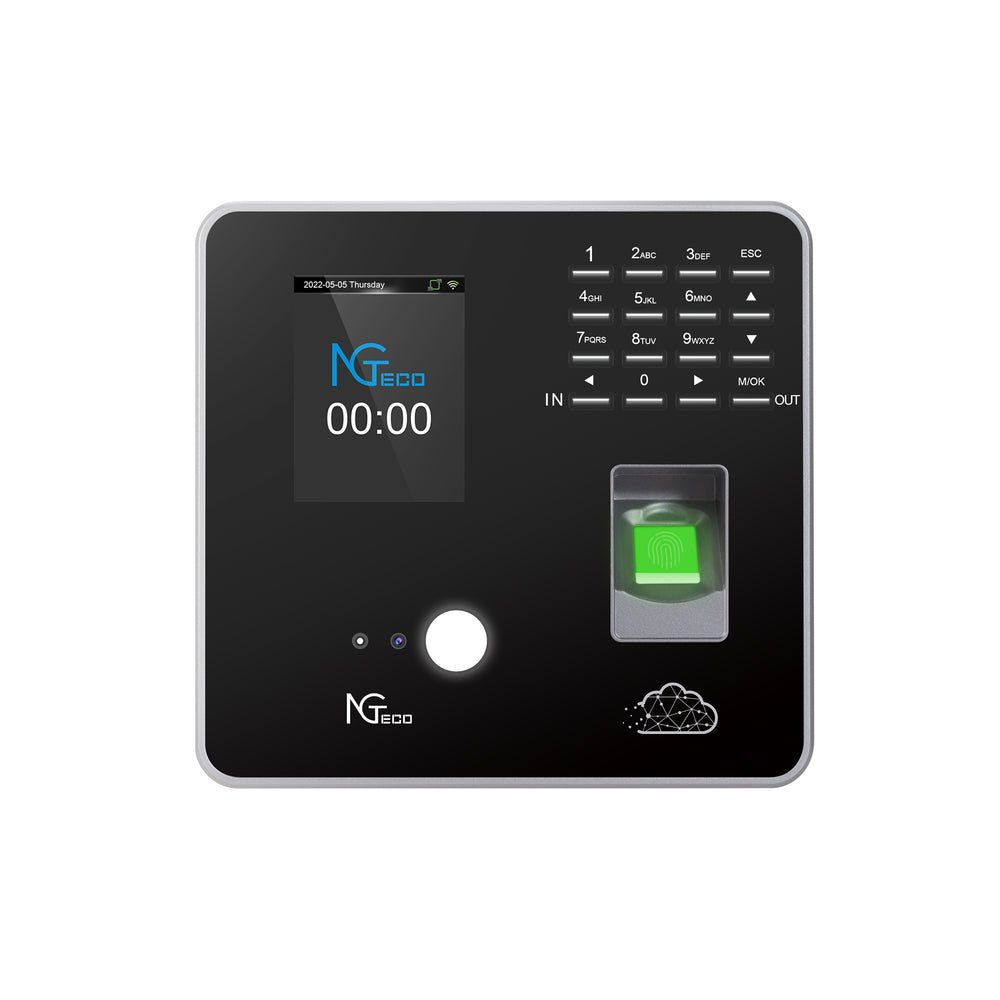
Start by selecting a web based time clock that explicitly advertises offline functionality—not all platforms support it equally, so confirm that the offline mode captures full punch data including timestamps, employee IDs, and job codes rather than just basic clock-in records. Next, choose your hardware. A wall-mounted tablet running the provider’s app works well for fixed locations—hardware providers like NGteco offer dedicated time clock terminals designed for durability in high-traffic environments—while smartphone-based solutions suit mobile teams. Configure each device by enabling offline mode in the app settings and setting sync intervals—most platforms default to syncing every few minutes when connectivity returns, but you can adjust this based on your needs. Test the system thoroughly before going live: disconnect Wi-Fi, have several employees clock in and out over a simulated shift, then reconnect and verify every record appears accurately in the cloud dashboard. Pay attention to conflict resolution—what happens if a manager edits a record online while the device holds an offline version. Train your staff on one critical point: the system works the same whether internet is available or not, so they should clock in normally regardless of connectivity status. Finally, establish a weekly check where you confirm sync logs show no unresolved entries, catching any device-level issues before they affect payroll.
Upgrading to Premium Features: A Cost-Effective Approach
Begin by documenting your single most time-consuming administrative task related to attendance—this becomes your first upgrade target. Research vendors by requesting trials specifically for that feature rather than evaluating entire premium suites at once. Most platforms offer 14 to 30-day trial periods on higher tiers, giving you enough time to measure actual impact. During the trial, track how many hours the feature saves compared to your current manual process and calculate whether the subscription cost falls below that labor value. If it does, commit to that single upgrade. Integrate the new capability with your existing time management tools incrementally—connect payroll integration before adding geofencing, or deploy advanced reporting before activating scheduling automation. Each addition should stabilize for two to three pay periods before layering on the next. Watch for bundled pricing that makes adding a second or third feature cheaper than purchasing individually, but only pursue bundles where you’ll genuinely use each component within the quarter. This staged approach keeps costs predictable, prevents staff overwhelm from too many simultaneous changes, and ensures every dollar spent on premium capabilities produces a documented return that justifies continued investment.
Building a Reliable Time Clock Strategy: Reliability First, Optimization Second
The choice between offline sync and premium features in web based time clocks comes down to a simple hierarchy: reliability first, optimization second. Offline sync ensures that every clock-in and clock-out is captured regardless of connectivity, protecting the foundational data your payroll depends on. Without accurate attendance records, no amount of advanced reporting or automation can deliver meaningful value. For small businesses operating in environments where internet access is unpredictable, this capability isn’t optional—it’s the baseline that makes everything else possible.
Premium features earn their place once that foundation is secure. Advanced reporting, payroll integration, geofencing, and scheduling tools each target specific inefficiencies that cost real money in administrative hours and missed insights. The smartest approach treats these as sequential investments rather than all-or-nothing decisions—add each capability when you can document the problem it solves and measure the return it delivers.
Small business owners who approach web based time clocks with this layered mindset avoid both overspending on unused features and underinvesting in critical reliability. Start with what keeps your data intact, then build toward what makes your operation faster and smarter. Strategic, phased adoption of time management tools turns attendance tracking from a persistent headache into a genuine competitive advantage.

Alexia is the author at Research Snipers covering all technology news including Google, Apple, Android, Xiaomi, Huawei, Samsung News, and More.