QSFP56 Price Guide: 200G Cost Per Bit Analysis (2026)
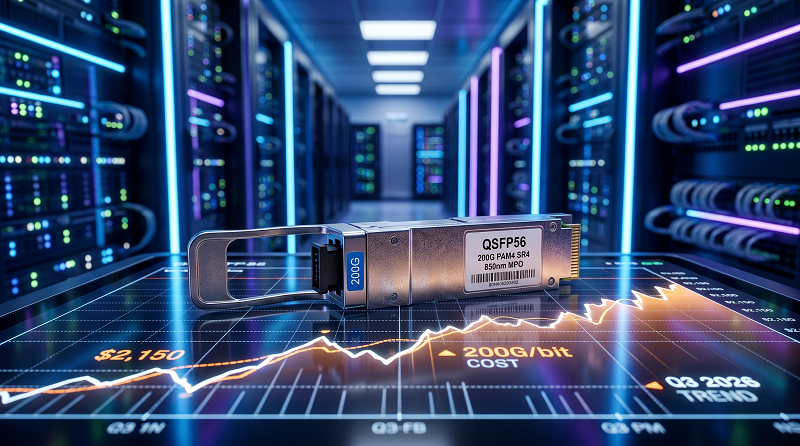
Your procurement team just asked a question you can’t answer with confidence: What does a QSFP56 actually cost?
Most network engineers know the technical specs cold—PAM4 signaling, four 50 Gbps lanes, and 200 Gbps total capacity. But when finance opens the requisition, the price column is often left blank or filled with a wild guess.
This guide fixes that. We’ve collected real-world QSFP56 price data from OEM lists, third-party vendors, and actual deployment budgets. The numbers below are the ones you can paste directly into your capex forecast.
By the end, you’ll know the exact price ranges for every QSFP56 module type, how cost-per-gigabit compares to 100G QSFP28 and 400G technologies, and what volume discounts look like at 50, 500, and 5,000 units. These aren’t list prices from a distributor catalog; they’re the numbers that show up on actual purchase orders.
What Drives QSFP56 Price
QSFP56 prices vary more than most people expect. The same form factor can range from under $200 to over $5,000, depending entirely on what is under the hood.
Three factors control the cost:
1. Optical complexity: SR4 uses 850nm VCSELs. Simple, mature, cheap. ER4 uses cooled LWDM4 lasers with DSP compensation. Complex, precise, expensive.
2. Reach distance: Every additional kilometer of reliable transmission adds optical components. A 40km ER4 module contains roughly 3× the active components of a 100m SR4.
3. Power and thermal design: Higher-power modules need better heat sinks and more complex driver circuits. An ER4 at 6.5W requires different packaging than an SR4 at 4W.
The underlying silicon—the 200G PAM4 DSP and SerDes—remains roughly constant across module types. The optical engine is where manufacturing costs diverge.
Here’s how that plays out in practice: a data center team buying SR4 optics for leaf-to-spine links within the same row pays for short-reach simplicity. A telecom engineer buying ER4 optics for a 35km metro link pays for optical precision. Both get 200 Gbps, but the bills look completely different.
QSFP56 Price by Module Type (2026)
The table below shows realistic street prices for QSFP56 modules from third-party vendors. OEM list prices from Cisco, Arista, and Juniper typically run 3 to 5 times higher.
| Module | Distance | Fiber | Third-Party Price | OEM Price Range | Use Case |
| QSFP56 DAC | ≤5m | Copper | $80 – $150 | $250 – $500 | Intra-rack server links |
| QSFP56 AOC | ≤100m | MMF | $150 – $300 | $400 – $800 | Intra-row switch links |
| QSFP56 SR4 | 100m (OM4) | MMF | $200 – $400 | $700 – $1,500 | Leaf-to-spine, same row |
| QSFP56 DR4 | 500m | SMF | $350 – $600 | $1,000 – $2,000 | Leaf-to-spine, same hall |
| QSFP56 FR4 | 2km | SMF | $500 – $900 | $1,500 – $3,000 | Spine-to-spine, campus |
| QSFP56 LR4 | 10km | SMF | $700 – $1,200 | $2,000 – $4,000 | Metro DCI |
| QSFP56 ER4 | 40km | SMF | $1,000 – $1,800 | $3,000 – $6,000 | Regional DCI |
The jump from SR4 to DR4 is roughly double the price for 5 times the distance. That seems favorable until you factor in the fiber plant itself.
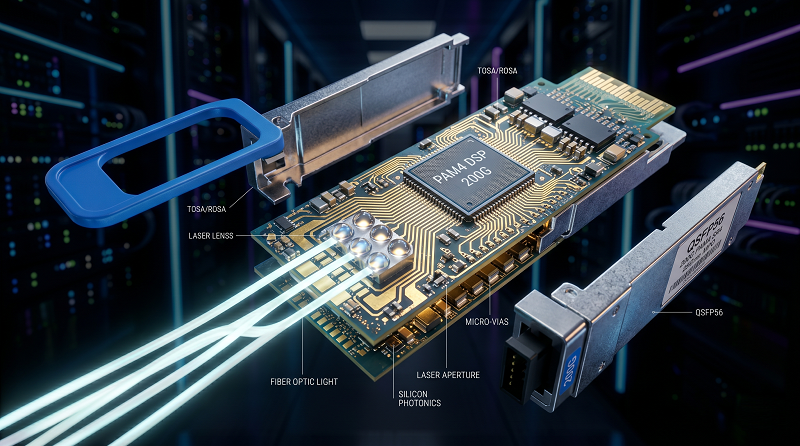
DR4 requires Single-Mode Fiber (SMF), which costs more to deploy than the multimode OM4 infrastructure found in many existing environments. The transceiver savings can quickly disappear into fiber installation costs if you’re retrofitting a multimode plant. We’ve seen infrastructure teams spend $15,000 on SMF cable installation just to save $8,000 on transceiver optics.
FR4 hits the sweet spot for many campus deployments. At roughly $500 to $900 third-party, it covers up to 2km over duplex LC single-mode fiber. That is enough for most data center campus interconnects without the sharp cost escalation of LR4 or ER4. We’ve seen teams over-specify LR4 for 1.5km links and pay 40% more than necessary—FR4 handles the distance flawlessly at a fraction of the price.
Cost Per Gigabit: QSFP56 vs QSFP28 vs QSFP-DD
Raw module price doesn’t tell the full story. Cost per gigabit — what you pay for each Gbps of capacity — reveals which technology gives the best value.
| Technology | Module Speed | Typical Module Price | Cost Per Gbps | Form Factor |
| QSFP28 SR4 | 100G | $150 – $300 | $1.50 – $3.00 | QSFP28 |
| QSFP56 SR4 | 200G | $200 – $400 | $1.00 – $2.00 | QSFP56 |
| QSFP-DD SR8 | 400G | $600 – $1,200 | $1.50 – $3.00 | QSFP-DD |
| QSFP112 SR4 | 400G | $800 – $1,500 | $2.00 – $3.75 | QSFP112 |
QSFP56 delivers the lowest cost per gigabit of any mainstream pluggable module in 2026. At roughly $1.00 to $2.00 per Gbps, it undercuts 100G QSFP28 on a capacity basis while utilizing the exact same MPO fiber infrastructure.
This economics shift matters for upgrade decisions. If you are running 100G QSFP28 today at $200 per module, replacing it with a 200G QSFP56 at $300 doubles your bandwidth for only a 50% increase in module cost. Your cost per gigabit drops by 25%.
The Hardware Catch: QSFP56 requires PAM4-capable switch ASICs. If your legacy legacy switches only support NRZ signaling, you cannot plug in a QSFP56 module and expect 200G links. Check your switch hardware specifications before making assumptions.
Interestingly, 400G modules have not yet beaten QSFP56 on a cost-per-bit basis. 400G QSFP-DD runs about $1.50 to $3.00 per Gbps, and the single-lane 100G-based QSFP112 is higher still at $2.00 to $3.75. For networks that require massive scale but don’t strictly need a 400G fat pipe per port today, QSFP56 remains the highly economical choice.
OEM vs Third-Party QSFP56 Price
This is where budgets get emotional.
A Cisco QSFP56-SR4 lists at roughly $1,200. An Arista QSFP-200G-SR4 runs around $1,000, and Juniper’s equivalent sits in the same tier. The third-party equivalent from a tier-1 optics vendor? $250 to $350.
For a 128-leaf fabric with dual-homed 200G uplinks, you need 256 QSFP56 modules. At OEM pricing, that is $256,000 to $307,000 just for short-range optics. At third-party pricing, it’s $64,000 to $90,000. The $170,000+ delta is real money—often exceeding the cost of the bare-metal switches themselves.
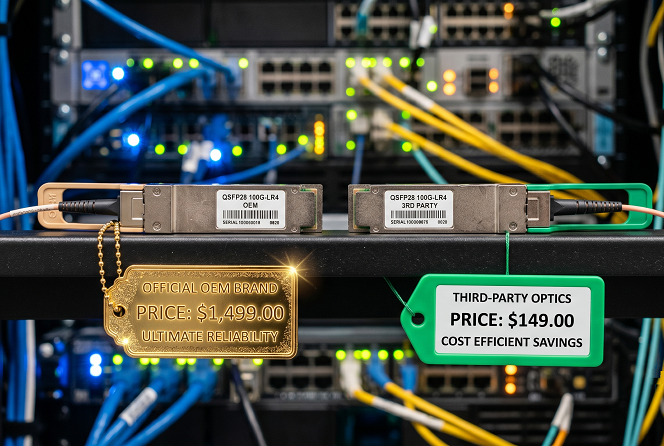
Here is how we advise teams evaluating this decision:
OEM modules make sense when:
·You have rigid vendor support requirements (some TAC policies require OEM optics to perform initial root-cause troubleshooting on physical links).
·You are operating mission-critical financial or healthcare networks where external legal liability dominates engineering decisions.
·Corporate procurement policies strictly mandate single-source OEM hardware.
Third-party modules make sense when:
·You are operating at web-scale (hyperscale data centers, large cloud providers, CDNs).
·You have in-house optical engineering expertise to verify compatibility and handle staging tests.
·Your switch vendor does not enforce hard optical lock-in via firmware.
·CapEx budget constraints are tight (which they usually are).
Most reputable third-party QSFP56 modules are manufactured in the exact same contract facilities as OEM-labeled units. Multi-Source Agreement (MSA) compliance ensures that the underlying electrical and optical specifications are identical. The variance isn’t the quality; it’s the label and the vendor margin.
Volume Pricing: What Quantity Actually Saves
Module pricing doesn’t scale linearly. The discount curve steepens at specific breakpoints.
| Quantity Tier | Discount vs Single Unit | Example SR4 Price | Effective Cost Per Gbps |
| 1–9 units | Baseline | $350 | $1.75 |
| 10–49 units | 10–15% | $300 | $1.50 |
| 50–199 units | 20–25% | $265 | $1.33 |
| 200–499 units | 30–35% | $230 | $1.15 |
| 500–999 units | 35–40% | $210 | $1.05 |
| 1,000+ units | 40–50% | $175 | $0.88 |
At 1,000 units, SR4 drops to roughly $0.88 per Gbps. That’s nearly half the cost per gigabit of a single QSFP28 SR4 module at list price.
The steepest part of the curve is between 50 and 200 units. If you’re planning a 64-leaf deployment with 8×200G uplinks per leaf, that’s 512 modules. You’ll hit the 35-40% discount tier. Planning for 48 leaves? That’s 384 modules, still in the 30-35% range.
One practical tip: consolidate your orders. Buying 200 SR4 modules and 50 FR4 modules as separate POs means two separate baseline negotiations. A single PO for 250 mixed modules usually gets better blended pricing than two smaller orders.
Hidden Costs That Blow Up QSFP56 Budgets
Module price is just the headline. Three hidden costs routinely catch teams off guard.
Power and cooling: QSFP56 modules draw between 4W and 7.5W each. A 32-port switch fully loaded with high-power QSFP56 optics can pull an extra 130W to 240W purely for transceiver operation. In a 128-leaf fabric with 256 modules, that scales to over 1,500W of additional load. Over a standard five-year depreciation cycle, electricity and ambient cooling costs add thousands to your Total Cost of Ownership (TCO).
Breakout cables: Leveraging a 200G port to feed 2x 100G connections changes your cabling economics. A QSFP56-to-2x-QSFP28 breakout cable runs $100 to $200. If you are breaking out hundreds of spine ports to support older 100G leaf switches, add $25,000 to $500,000 to your cabling line item.
Fiber plant upgrades: Moving from 100G QSFP28 SR4 to 200G QSFP56 SR4 uses the same MPO-12 OM4 fiber. However, upgrading to single-mode QSFP56 DR4 over longer campus distances requires verifying your link loss budget. Legacy single-mode fiber plants with high-density patch panels can cause signal degradation on 500m PAM4 runs. If re-terminating or massive fusion-splicing remediation is needed, high-end contractor fees can quickly add $2,000 to $5,000 per infrastructure run.
Mini-Story: The $340,000 Surprise
In late 2024, a mid-size cloud provider we’re familiar with planned a 96-leaf spine-leaf upgrade. Their budget assumed OEM QSFP56-SR4 pricing at 1,100 per module. With 768 modules needed (96 leaves × 8 uplinks), they are all located 1,100 per module. With 768 modules needed (96 leaves ×8 uplinks), they allocated $845,000 for optics.
During procurement, a network architect suggested testing third-party modules in a staging environment. The test passed. Compatibility was clean. FEC negotiation worked. The team re-ran the budget with third-party pricing at $280 per module.
The new optics total: 215,000. A215,000. A630,000 savings.
The catch? Their Cisco SmartNet contract included a clause that TAC could refuse support for links with non-Cisco optics. They negotiated a hybrid approach: third-party modules for standard leaf-to-spine links, OEM modules for critical DCI connections. Final savings: $480,000. Enough to fund an entire additional spine switch.
The lesson: always test third-party modules in your actual switch hardware before committing. And read your support contracts carefully.
When QSFP56 Price Makes Sense vs Alternatives
Use this framework for upgrade decisions:
| Scenario | Best Choice | Why |
| New 200G spine, budget constrained | Third-party QSFP56 | Lowest cost per gigabit, proven technology |
| The existing 100G spine needs more bandwidth | QSFP56 over QSFP28 | Double bandwidth, same fiber, better oversubscription |
| Planning for 400G in 12-18 months | QSFP-DD switches with QSFP56 modules today | Forward compatibility protects investment |
| Metro DCI, 10-40km | QSFP56 LR4/ER4 | Simpler than DWDM for single 200G waves |
| Multi-tenant data center, strict SLA | OEM QSFP56 | Support contract compliance |
For most modern data centers, third-party QSFP56 hits the sweet spot. It’s mature enough that compatibility issues are rare. It’s cheap enough that the cost per gigabit beats 100G. And it’s forward-compatible enough that QSFP-DD switches accept QSFP56 modules today without adapter cages.
Conclusion: Build Your QSFP56 Budget With Real Numbers
QSFP56 price in 2026 ranges from roughly 200 for SR4 to 200 for SR4 to 1,800 for ER4 from quality third-party vendors. OEM pricing multiplies those numbers by 3-5×. On a cost-per-gigabit basis, QSFP56 is the most economical pluggable optic available, running $1.00-2.00 per Gbps at volume.
Here’s your budgeting checklist:
1. Count your ports and module types by distance tier
2. Apply volume discounts based on total quantity
3. Add 15-20% for breakout cables if needed
4. Factor power and cooling at 4-6.5W per module
5. Verify fiber plant compatibility before ordering
6. Test third-party modules in your hardware if support contracts allow
The teams that budget accurately are the ones that know their QSFP56 price before finance asks. Getting the module cost right upfront prevents the awkward mid-project revision where you explain why the optics line item doubled.

Alexia is the author at Research Snipers covering all technology news including Google, Apple, Android, Xiaomi, Huawei, Samsung News, and More.